
A 61-key keyboard strikes a practical balance for many musicians, offering enough range for two-handed play while remaining compact enough for easy transport and home studio integration. However, because 61-key models can range from ultra-lightweight MIDI controllers to heavy, feature-packed synthesizers and arrangers, choosing the right support is critical. The stand you select directly impacts your playing posture, the safety of your instrument, and how easily you can transport your setup.
To find the perfect match, you must evaluate the three primary design types: the highly portable X-stand, the rigid and spacious Z-stand, and the heavy-duty table-style stand. Each design offers distinct trade-offs in stability, legroom, and setup speed. By understanding how these structural differences align with your playing style and environment, you can protect your investment and ensure a comfortable playing experience.
Core Differences Between X-Stand, Z-Stand, and Table-Style Designs
Understanding the physical geometry of each stand type is the first step in determining which one will best support your 61-key keyboard. These designs distribute weight differently and occupy distinct footprints in your room or on a stage.
Products mentioned in this guide
Prices are valid at publication and may change. Please refer to the product page for the latest price.
An X-stand features a classic scissor-like design with two metal tubes crossing at a central pivot point. They are available in single-braced configurations, which have one vertical bar on each side, or double-braced configurations, which feature two overlapping bars on each side for added reinforcement. The height is adjusted by changing the angle of the cross, which inherently alters the width of the top support arms and the bottom feet.
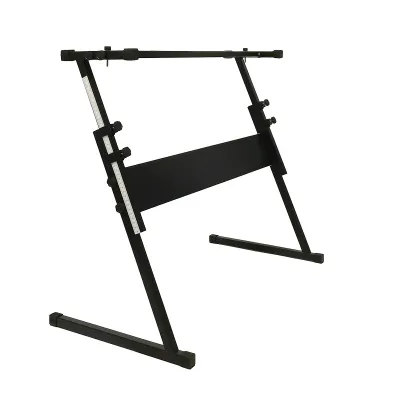
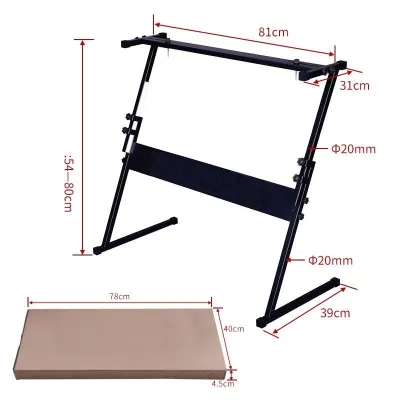
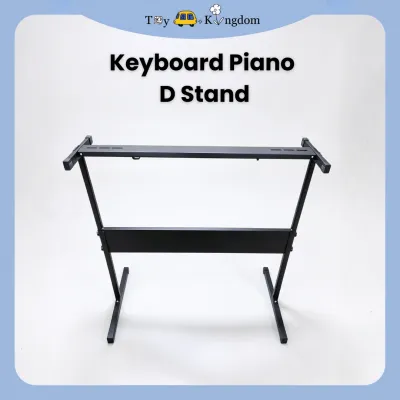
A Z-stand consists of two vertical, Z-shaped side frames connected by a horizontal center crossbar. This structure creates a highly rigid frame where the height and width can often be adjusted independently. Because the support pillars are located at the outer edges of the keyboard, the space directly beneath the instrument remains completely open.
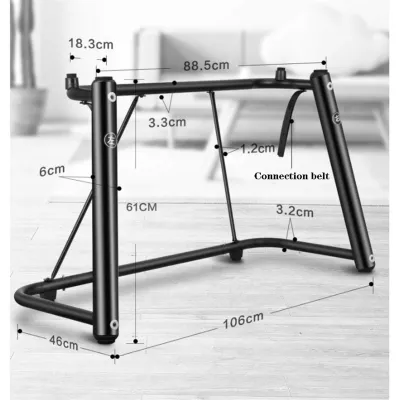
A table-style stand resembles a heavy-duty, four-legged desk. It features four independent, telescoping legs connected to a rectangular top frame. Like the Z-stand, a table-style stand allows you to adjust the height of the legs and the width of the frame separately, ensuring a custom fit for your specific keyboard model without sacrificing structural integrity.
Evaluating Stability and Weight Support for 61-Key Models
Stability is paramount when supporting a keyboard, especially during energetic performances or when using heavier 61-key workstations. A wobbling stand not only distracts from your playing but also poses a constant tipping hazard.

The stability of any stand is determined by its base footprint and center of gravity. X-stands, particularly single-braced models, have a narrower top support when adjusted to standing heights. This narrow profile raises the center of gravity, making the setup susceptible to lateral sway or tipping if bumped. Double-braced X-stands mitigate this risk by adding torsional rigidity, but they still cannot match the solid foundation of alternative designs.
Z-stands excel in lateral stability due to their wide, rectangular base bars that rest flat on the floor. The vertical pillars distribute the weight of the keyboard straight down to the outer edges of the base, virtually eliminating side-to-side wobble. This makes the Z-stand an excellent choice for heavy-handed players who execute rapid glissandos or expressive synth solos.
Table-style stands offer the highest level of stability among the three types. With four independent contact points on the floor, they distribute weight evenly across a wide surface area. Many table-style stands also feature adjustable leveling feet, which are essential for stabilizing your keyboard on uneven floors, such as rustic tiles or outdoor stages.
Before purchasing, always check the manufacturer’s stated weight capacity and compare it to the actual weight of your 61-key keyboard. While a lightweight controller might sit safely on a single-braced X-stand, a professional synthesizer weighing over 10 kilograms demands the robust support of a double-braced X-stand, a Z-stand, or a table-style model.
Comparing Portability, Setup Speed, and Storage Footprint
For gigging musicians, music teachers, or players with limited living space, how easily a stand folds, packs, and stores is just as important as how well it holds the instrument.
X-stands are the undisputed champions of portability and setup speed. They utilize a quick-release pull-pin mechanism that allows the stand to fold completely flat in a single motion. Once collapsed, an X-stand takes up minimal depth, making it easy to slide behind a wardrobe, store under a bed, or pack into a crowded car trunk alongside other performance gear.
Z-stands are significantly bulkier to transport. While some modern Z-stands feature folding joints, many require partial disassembly by loosening hand screws to break the frame down into flat pieces. This process adds several minutes to your setup and teardown time at a venue, and the individual metal components can be awkward to carry without a dedicated gig bag.
Table-style stands fall in the middle of the portability spectrum. The four legs typically fold flat against the underside of the main frame, similar to a portable card table. While this makes the stand relatively flat for transport, the overall length and width of the top frame remain fixed, requiring a larger storage footprint than a collapsed X-stand.
When evaluating portability, consider the long-term wear on the adjustment joints. In humid, tropical climates, metal-on-metal friction points and spring-loaded pins can accumulate moisture, leading to stiffness or rust over time. Regularly inspecting and maintaining these moving parts ensures your stand continues to fold and unfold smoothly.
Assessing Legroom, Ergonomics, and Desk Integration
If you plan to play your keyboard while seated, the space beneath the stand directly affects your physical comfort, posture, and ability to use expression pedals.
X-stands present a significant ergonomic challenge for seated players. Because the support bars cross in the center, they block the space directly under the keyboard. This “knee-knock” design forces you to splay your knees outward or sit further back from the keys, which can lead to poor posture, shoulder tension, and lower back strain during long practice sessions. Furthermore, placing a sustain or expression pedal is difficult, as the crossing bars limit where the pedal can sit on the floor.
Z-stands and table-style stands offer completely open-front designs, providing unrestricted legroom. This allows you to sit comfortably with your knees bent at a natural 90-degree angle and place your feet flat on the floor. It also leaves ample space for a full multi-pedal setup, allowing you to position sustain, expression, and footswitch pedals exactly where you need them.
For home studios, table-style stands offer excellent integration with other desktop equipment. Because they function like a desk, you can easily slide a standard keyboard bench or an ergonomic office chair completely underneath the stand when you are not playing, saving valuable floor space in small rooms. Additionally, some table-style stands can be fitted with attachable second tiers to hold a laptop, tablet, or small secondary MIDI controller directly above your main 61-key keyboard.
Maintaining proper wrist and elbow alignment is crucial to preventing repetitive strain injuries. Ensure that whichever stand you choose can adjust to a height where your forearms run parallel to the floor when your hands are resting on the keys.
Decision Matrix: Which Stand Type Matches Your Playing Environment?
To simplify your decision, consider how your primary playing environment and daily routine align with the strengths of each stand design.
Choose an X-Stand if:
- You are a gigging musician who needs to set up and pack down in under a minute.
- You have limited storage space at home and need a stand that folds completely flat.
- You are working with a tighter budget and own a lightweight 61-key keyboard.
- You primarily play standing up, where knee clearance is not an issue.
Choose a Z-Stand if:
- You primarily play seated and require maximum legroom and natural pedal placement.
- You own a heavier 61-key synthesizer or workstation that requires excellent lateral stability.
- You want a semi-permanent setup that can still be disassembled for occasional transport.
- You prefer a highly rigid frame that will not wobble during aggressive playing styles.
Choose a Table-Style Stand if:
- You are setting up a permanent home studio or dedicated practice corner.
- You want to integrate your keyboard setup with other studio gear or a second-tier expansion.
- You require precise height adjustments to match a specific chair or bench.
- You need to set up on uneven flooring where adjustable leveling feet are necessary.
Before making your final choice, verify if your 61-key keyboard has an unusual bottom profile. Some older models or specific arranger keyboards feature curved undersides or battery compartments that protrude, which may require the wider, flat support surfaces of a table-style stand rather than the narrow rubber pads of an X-stand.
Pre-Purchase Checks for Keyboard and Stand Compatibility
Before finalizing your purchase on any online marketplace or at a local music store, perform a few quick measurements to guarantee a secure fit and avoid the hassle of returns.
First, measure the physical depth and width of your 61-key keyboard. Compare these dimensions to the length of the stand’s top support arms. The support arms should cover at least two-thirds of the keyboard’s depth to prevent the instrument from tipping forward or backward when you press the keys near the edges. If you are choosing an X-stand, remember that raising the stand to a standing height narrows the width of the top arms, so ensure the stand will still safely support the width of your keyboard at your preferred playing height.
Second, inspect the contact points. High-quality stands feature non-slip rubber end caps or sleeves on the support arms to grip the underside of your keyboard and prevent it from sliding. Some stands also include safety straps with threaded screws that attach directly to corresponding holes on the bottom of compatible keyboards, providing an extra layer of security against accidental bumps.
Finally, review the seller’s return policy and warranty terms. Look for warranties that cover structural defects, such as failing weld joints or slipping adjustment pins. Purchasing from reputable sellers on established ecommerce platforms ensures you have recourse if the stand arrives with uneven legs or missing assembly hardware.
Frequently Asked Questions (FAQ)
Can I use a microphone stand or generic table instead of a dedicated keyboard stand?
Using non-dedicated furniture or microphone stands is highly discouraged. Generic tables often lack the correct height adjustments, leading to poor playing posture and wrist strain. Furthermore, household tables do not have non-slip grips or safety straps, leaving your keyboard vulnerable to sliding off. Microphone stands are structurally incapable of supporting the weight and lateral forces of a keyboard, posing an immediate tipping hazard that could result in costly damage to your instrument.
Do I need a double-braced X-stand for a 61-key keyboard?
Whether you need a double-braced model depends on the weight of your keyboard and your playing style. If you own a lightweight MIDI controller or entry-level keyboard weighing under 5 kilograms, a single-braced X-stand is generally sufficient for casual home use. However, if you own a heavier professional workstation, play with a heavy hand, or perform live on stage, the added torsional rigidity of a double-braced X-stand is highly recommended to minimize distracting wobble and ensure long-term durability.
How do I prevent my keyboard from sliding off an X-stand?
To secure your keyboard on an X-stand, ensure the rubber end caps on the support arms are clean and properly positioned to grip the flat sections of your keyboard’s underside. If your keyboard has built-in threaded inserts on the bottom, utilize the safety straps that come with many high-quality X-stands to bolt the instrument directly to the frame. Additionally, always place the stand on a level surface, and adjust the leveling end caps on the stand’s feet to compensate for any minor floor unevenness.

Community discussion
Share your experience or ask a question. Comments are reviewed before publication.