
Selecting the right MIDI keyboard controller is one of the most critical decisions you will make when building or upgrading your music production studio. The Novation Launchkey series has long been a favorite among electronic music producers, beatmakers, and keyboardists due to its deep integration with popular digital audio workstations (DAWs) and its versatile hardware layouts. However, with models ranging from a highly portable 25-key version to a full-sized 88-key controller, finding the perfect match requires a careful look at your physical workspace, your musical background, and your specific production workflow.
In tropical environments, setting up a home studio comes with unique considerations. High humidity, dust, and limited room ventilation can affect how you store and maintain your electronic equipment. Choosing a model that fits comfortably on your desk without crowding your workspace not only improves your creative flow but also makes it easier to keep your gear clean, protected, and properly ventilated.
Assessing Your Desk Space and Physical Setup
Before you order any keyboard controller from an online marketplace or local music store, you must measure your available desk space. Use a physical tape measure to determine the exact width and depth of the area where you plan to place the keyboard. Remember to account for other essential studio gear, such as your computer keyboard, mouse, audio interface, and studio monitors. If your desk is too crowded, you may find yourself constantly shifting equipment around, which disrupts your creative momentum.
Products mentioned in this guide
![Novation Launchkey Mini [MK3] — Portable 25-Key USB MIDI Keyboard Controller with DAW Integration Chord Mode and Arpeggiator — for Music Production](https://img.lazcdn.com/g/p/3eb4f9a298e9fd5f26cfbb25296ede87.png_400x400q80.png_.webp)
Prices are valid at publication and may change. Please refer to the product page for the latest price.
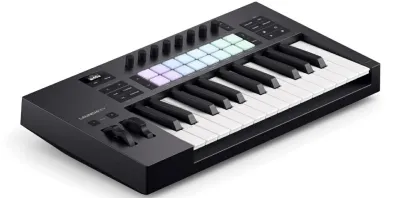
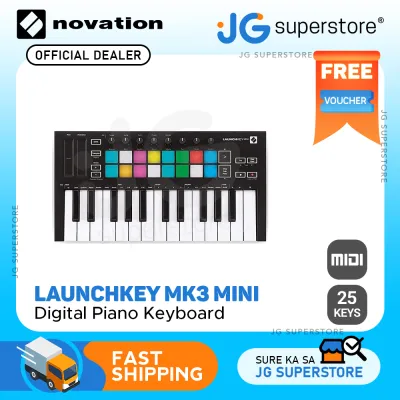
If you are working in a compact bedroom studio or a shared living space, a smaller footprint is often the most practical choice. A 25-key or 37-key controller can sit comfortably in front of your computer monitor or even slide into a desk drawer when not in use. This portability is also highly beneficial if you frequently travel, collaborate in different home studios, or need to pack your gear away in a protective gig bag to shield it from dust and humidity during the dry season.
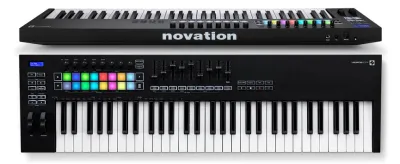
For larger setups, a 49-key or 61-key controller requires a dedicated keyboard stand or a wide, sturdy desk. These mid-sized models are wider and heavier, meaning they cannot be easily moved on a whim. If you are eyeing the massive 88-key model, ensure your desk can support its substantial weight and length. A weak or unstable desk can wobble during energetic performances, which can damage both the controller and your other studio equipment.
Cable management and power delivery are also crucial factors in your physical setup. Most compact and mid-sized Launchkey models are bus-powered, meaning they draw all the power they need directly from your computer via a single USB cable. This keeps your workspace clean and reduces the need for extra wall outlets, which are often at a premium in home studios. However, if you are using a long USB cable run or connecting through a non-powered USB hub, you must verify that the controller receives stable power to prevent connection drops during your recording sessions.
Matching Key Count to Your Playing Style
Your musical background and how you plan to play the keyboard should directly dictate the key count you choose. If you are primarily a beatmaker, electronic music producer, or someone who programs notes using a mouse, the 25-key or 37-key models are excellent choices. These compact layouts are perfect for playing simple basslines, lead melodies, and triggering drum samples. While you will need to use the physical octave shift buttons to access higher or lower registers, this is a minor inconvenience for non-keyboardists who focus on step sequencing and single-note entry.

The 37-key model deserves special mention as a highly versatile middle ground. It offers an extra octave over the 25-key version, allowing you to play basic two-handed chord progressions and melodies simultaneously without constantly reaching for the octave buttons. It remains compact enough to fit on almost any desk, making it a favorite for producers who want a portable setup but still desire some room for musical expression.
If you have a background in classical piano or want to learn how to play with both hands properly, you should look at the 49-key or 61-key models. These sizes provide enough physical space to play complex chord voicings, split-keyboard arrangements, and flowing melodies without running out of keys. They are the standard choice for traditional keyboardists transitioning into digital music production, offering a familiar playing experience while maintaining a reasonable studio footprint.
The 88-key model is designed specifically for pianists, film composers, and session musicians who demand a full-range keyboard. Playing classical pieces, complex jazz arrangements, or virtual acoustic pianos requires all 88 keys to capture the full emotional range of the instrument. Additionally, the key action on the 88-key model is typically different from the lighter, springy synth-action keys found on the smaller models. Before purchasing, verify the exact keybed specifications on the manufacturer’s official product page to ensure the key resistance matches your playing preferences.
Evaluating Production Workflow and DAW Control Needs
Your choice of Launchkey model should also align with how you interact with your music production software. If your workflow relies heavily on finger drumming, launching clips, and triggering loops, the velocity-sensitive RGB pads are a vital feature. These pads allow you to tap out drum patterns naturally and get visual feedback directly from your DAW. While all Launchkey models feature these pads, the layout and physical space around them can vary, so consider how much room you need for comfortable finger drumming.
For those who prefer a hands-on mixing experience, physical faders and rotary knobs are game-changers. The larger models (49, 61, and 88 keys) typically feature a bank of physical faders alongside the rotary knobs. These faders allow you to control track volumes, adjust panning, and record real-time automation parameters like filter sweeps and volume fades. If you enjoy mixing your tracks on physical controls rather than clicking and dragging a mouse, these larger models will significantly speed up your workflow.
Conversely, if you prefer to do most of your mixing and automation inside your DAW using a mouse and keyboard, the extra physical faders on the larger models might go unused. In this case, a smaller 25-key or 37-key model—which still includes rotary knobs for basic parameter adjustments—will save you both desk space and money. Focus on buying only the physical controls that you will actually use in your daily production routine.
Finally, always verify DAW integration and software compatibility before making your purchase. While the Launchkey series is renowned for its seamless integration with Ableton Live, it also offers dedicated integration modes for Logic Pro, Cubase, FL Studio, and other major DAWs. Check the manufacturer’s official specifications to ensure your specific operating system and DAW version are fully supported. This simple check prevents the frustration of buying a controller only to find that its advanced integration features do not work with your current software setup.
Novation Launchkey Model Comparison Matrix
To help you visualize the physical and functional differences between the models, refer to the comparison matrix below. This table outlines the typical hardware configurations and footprints for each key count.
| Model Size | Keybed Action Type | Physical Faders | Rotary Knobs | RGB Pads | Primary Studio Role |
|---|---|---|---|---|---|
| 25 Keys | Synth-action | None | 8 Knobs | 16 Pads | Ultra-portable beat-making and synth programming |
| 37 Keys | Synth-action | None | 8 Knobs | 16 Pads | Compact melody writing and basic chord progressions |
| 49 Keys | Synth-action | 9 Faders | 8 Knobs | 16 Pads | Two-handed playing and hands-on mixing control |
| 61 Keys | Synth-action | 9 Faders | 8 Knobs | 16 Pads | Full keyboard performance and complete DAW control |
| 88 Keys | Semi-weighted / Weighted | 9 Faders | 8 Knobs | 16 Pads | Professional piano performance and film scoring |
Please note that hardware features, included software bundles, and exact dimensions can vary depending on the specific generation of the Launchkey you are purchasing. Always verify the exact specifications, button layouts, and included software licenses on the manufacturer’s official product label or authorized store page before finalizing your order.
Final Decision Framework: Which Model Should You Buy?
To make your final decision, use this structured checklist to match your specific studio conditions and musical goals to the right Launchkey model:
- Choose the 25-Key or 37-Key Model if:
- Your desk space is highly limited, or you work from a laptop on the go.
- Your music production focuses primarily on beat-making, electronic music, and step sequencing.
- You do not have a formal piano-playing background and do not need to play with both hands simultaneously.
- You want a lightweight, easily storable controller that is simple to protect from tropical dust and humidity.
- Choose the 49-Key or 61-Key Model if:
- You have a dedicated studio desk or keyboard stand with ample physical space.
- You want to play two-handed chord progressions, melodies, and basslines in real-time.
- You want physical faders to mix your tracks and record automation without relying solely on a mouse.
- You are looking for the ultimate balance between musical playability and comprehensive DAW control.
- Choose the 88-Key Model if:
- You are a trained pianist who requires the full range of a traditional piano for your performances.
- You have a large, sturdy studio desk or a heavy-duty keyboard stand that can safely support a full-sized controller.
- You prefer a heavier key action (such as semi-weighted or weighted keys) over light synth-action keys.
Before clicking the buy button on any online marketplace, double-check your DAW compatibility and ensure you have the correct USB cables or adapters for your computer setup. Taking a few minutes to verify these details guarantees a smooth, plug-and-play experience the moment your new controller arrives at your doorstep.
Frequently Asked Questions (FAQ)
Do I need a separate audio interface to use a Novation Launchkey?
No, you do not need a separate audio interface simply to power or use a Novation Launchkey. The Launchkey is a MIDI controller, which means it does not generate or transmit audio signals on its own; instead, it sends digital control data (MIDI) to your computer or mobile device via a USB cable. Your computer’s internal sound card can process this data and play the sound of your virtual instruments through your computer speakers or headphones.
However, investing in a dedicated audio interface is highly recommended for serious music production. An audio interface provides professional-grade digital-to-analog conversion, which significantly reduces audio latency—the slight delay between pressing a key on your Launchkey and hearing the sound from your speakers. It also allows you to connect high-quality studio monitors and headphones, ensuring you hear your mixes with maximum clarity and accuracy.
Can I use the Launchkey with mobile devices or tablets?
Yes, you can use the Novation Launchkey with mobile devices and tablets, but you must meet specific hardware and software conditions. To connect the controller to an iOS or Android device, you will typically need a compatible adapter, such as an official Apple Camera Connection Kit (for Lightning ports) or a high-quality USB-C to USB-A adapter. These adapters allow the mobile device to recognize the incoming USB MIDI signals.
Additionally, you must consider power consumption and software compatibility. Because mobile devices have limited battery capacity, they may not always output enough power over USB to run a larger MIDI controller (bus power). If your Launchkey does not power up or displays a power warning on your tablet, you will need to connect it through a powered USB hub. Finally, verify that the mobile music applications you plan to use fully support external USB MIDI controllers before starting your mobile production sessions.

Community discussion
Share your experience or ask a question. Comments are reviewed before publication.