
The ideal piano tablet holder is one that matches the physical architecture of your keyboard while keeping your digital sheet music stable and readable. Because keyboards and digital pianos vary significantly in chassis design, music rest placement, and overall footprint, a universal solution rarely exists. The right choice depends on your specific instrument’s size, your playing style, and the environment where you practice or perform.
In the Philippines, local environmental factors play a surprisingly large role in how well a tablet holder performs over time. High relative humidity can cause cheap adhesive backings on rubber pads to slide off, while salty coastal air or humid tropical weather can accelerate rust on low-grade metal joints. Furthermore, intense playing in warm rooms can cause hands to sweat, making quick adjustments to a poorly designed clamp difficult and frustrating. Selecting a holder with robust materials and mechanical joints ensures your device remains safe and your focus stays on the music.
Key Factors for Choosing a Piano Tablet Holder
When shopping for a piano tablet holder, the first step is evaluating the physical specifications of both your tablet and the holder itself. Many musicians make the mistake of checking only the screen size of their tablet, forgetting that the overall dimensions and weight change dramatically once a protective case or folio is added. A heavy-duty rugged case can double the thickness of a tablet, making it too wide for standard spring-loaded brackets. Always measure the total thickness and weight of your device with its case on, and compare these figures against the holder’s maximum jaw capacity and weight rating.
Products mentioned in this guide
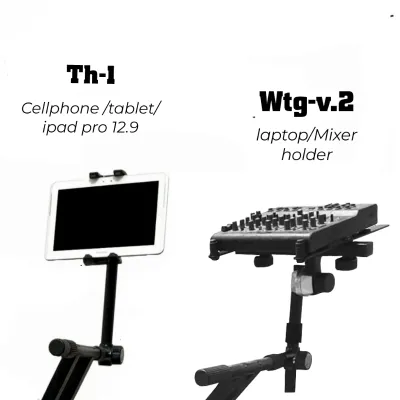
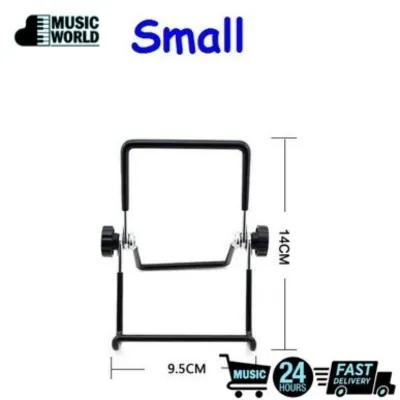
Prices are valid at publication and may change. Please refer to the product page for the latest price.
The clamp mechanism is the next critical component to analyze. Tablet holders generally use either spring-loaded tension clamps or screw-tightened C-clamps. Spring-loaded clamps offer quick mounting and removal, but they must have sufficient jaw depth to grip the edges of your tablet securely without pressing on the volume or power buttons. Screw-tightened clamps provide a much stronger grip on the keyboard chassis or music rest, but they require a flat, parallel surface to attach to. You must verify the maximum opening width of the clamp to ensure it can accommodate the thickness of your keyboard’s casing or the lip of your music stand.
Material stability and joint tension are vital for preventing the screen from bouncing while you play. Every time you strike a key, especially during fortissimo passages or energetic rhythmic sections, vibrations travel through the keyboard stand and up into the tablet holder. If the holder is made of thin, flexible plastic or has weak ball joints, the screen will shake, making it incredibly difficult to read your sheet music. Look for holders constructed from aluminum alloys or high-density polycarbonate, and prioritize designs that feature locking mechanical joints or heavy-duty tightening collars rather than simple friction-based pivots.
Finally, consider how tropical conditions affect these materials over time. In humid climates, rubberized coatings can become sticky or degrade, and steel components without a powder-coated or anodized finish can develop surface rust. Choosing hardware with stainless steel screws, anodized aluminum arms, and high-quality silicone padding rather than cheap foam will ensure the holder remains functional and reliable through years of daily practice.
Matching Holders to Keyboard Sizes and Designs
The size and design of your keyboard dictate where and how you can mount a tablet holder. Portable 61-key keyboards are lightweight and compact, but they often lack a sturdy, built-in music rest or a flat rear panel. Because these instruments are frequently placed on lightweight X-stands, attaching a heavy clamp directly to the keyboard can cause the entire setup to wobble. For 61-key setups, a microphone stand adapter or a lightweight clip-on mount attached to the keyboard stand itself is often the most stable configuration, keeping the weight off the instrument’s plastic chassis.

For 76-key keyboards, which are common among gigging musicians and intermediate students, the rear panel of the instrument is often curved, angled, or sloped to accommodate internal speakers and control panels. This uneven geometry makes standard flat-surface clamps difficult to secure. When dealing with a 76-key setup, look for holders with highly adjustable gooseneck arms or multi-angle ball joints. These designs allow you to clamp the holder to a straight section of the keyboard stand or the lower frame and then bend the arm around the curved chassis to position the screen exactly where you need it.
Full-sized 88-key digital pianos and stage pianos present a different set of challenges. These instruments are heavy, stable, and often feature wide, flat music rests made of wood, acrylic, or thick plastic. While these rests can easily support the weight of a tablet, clamping a holder directly to them can scratch premium polished finishes or overload the mounting brackets of the rest. For high-end digital pianos, a heavy-duty freestanding floor stand positioned behind or beside the piano is often the safest choice. If you prefer a clamp-on style, ensure the clamp jaws are lined with thick, non-marring silicone and that the weight of the tablet is distributed evenly across the rest.
Evaluating Mounting Styles for Your Playing Setup
Selecting the right mounting style depends heavily on your physical playing environment, posture, and available space. Clamp-on and lip-mount holders are incredibly popular because they keep the tablet close to your natural line of sight, mimicking the position of traditional sheet music. These holders are ideal for home setups where the keyboard is placed against a wall or integrated into a desk. However, before purchasing a clamp-on model, you must inspect your music rest or desk edge to ensure there is sufficient clearance for the clamp’s lip and that the surface can handle the concentrated clamping pressure without cracking.
Freestanding floor stands offer the ultimate in flexibility and stability, making them the preferred choice for stage pianos, performances, and spacious home studios. Because they do not attach to the keyboard itself, they completely isolate the tablet from key-strike vibrations, ensuring a perfectly still screen even during intense playing. When evaluating a floor stand, pay close attention to the base design. A heavy, weighted round base provides excellent stability but can be difficult to transport, while a tripod base folds down easily for travel but requires a larger floor footprint, creating a potential trip hazard in tight spaces or dimly lit stage wings.
For multi-instrumentalists, vocalists, or keyboardists who already use a microphone during performances, microphone stand adapters are an exceptionally efficient solution. These holders clamp directly to the vertical shaft or the boom arm of an existing mic stand, saving valuable floor space and reducing gear clutter. When choosing a mic stand adapter, verify that the mounting bracket is compatible with standard microphone stand thread sizes, which are typically 5/8-inch or 3/8-inch with an adapter. Additionally, ensure your microphone stand is weighted properly; adding a heavy tablet to a fully extended boom arm can easily cause a lightweight stand to tip over.
What to Verify Before Purchasing Online
Buying a piano tablet holder from an online marketplace requires careful verification to avoid the hassle of returns and incompatible hardware. Before placing an order, take precise measurements of your setup. Use a ruler or caliper to measure the exact thickness of the surface where you plan to attach the clamp, whether it is the edge of a wooden music rest, a metal stand tube, or the keyboard chassis itself. Next, measure your tablet’s height, width, and depth while it is inside its daily-use protective case, as relying on the manufacturer’s bare-device specifications often leads to buying a holder with jaws that are too narrow.
Because you cannot physically test the holder before it arrives, spend time reading user reviews on ecommerce platforms, paying close attention to feedback from other keyboard players. Look for recurring complaints regarding joint slippage, where the weight of a larger tablet causes the holder to slowly sag during a practice session. Watch out for mentions of excessive screen vibration or clamp failures, which are common indicators of cheap plastic construction. If a review mentions that the clamp stripped its threads or cracked under moderate pressure, it is best to look for an alternative model.
Finally, always verify the retailer’s return and exchange policies specifically regarding hardware compatibility. Since keyboard designs are highly non-standard, there is always a small chance that a holder will not fit your specific instrument despite careful measuring. Choosing a seller that offers hassle-free returns or exchanges ensures that you will not be stuck with an unusable accessory if the clamp cannot clear an unexpected curve on your keyboard’s chassis.
Frequently Asked Questions (FAQ)
Can I use a standard desk tablet stand on a digital piano?
Using a standard desk tablet stand on a digital piano is generally not recommended due to stability and safety concerns. Desk stands are designed for flat, stationary surfaces and rely on gravity and light rubber feet to stay in place. Most digital piano music rests are angled backward, which prevents a flat-bottomed desk stand from sitting securely. The vibration from playing the keys can easily cause a standard desk stand to slide off the angled rest, risking expensive damage to your tablet. Additionally, on smaller keyboards, a wide desk stand base can block essential control buttons, sliders, or even the upper register of the keys, disrupting your playing experience.
How do I prevent the clamp from scratching my keyboard's finish?
To protect your keyboard’s finish from scratches and pressure marks, always check that the clamp jaws of the holder feature factory-installed rubber, silicone, or dense foam padding. If the clamp consists of bare metal or hard plastic, do not attach it directly to your instrument. You can easily create a protective barrier by placing a thin microfiber cloth or a small piece of adhesive felt padding between the clamp jaws and the keyboard surface. This not only prevents scratches on delicate plastic or polished wood finishes but also increases friction, providing a more secure grip that prevents the holder from slipping during use.

Community discussion
Share your experience or ask a question. Comments are reviewed before publication.