
Quick Answer: Which Launchkey MK3 Size Should You Choose?
Choosing the right MIDI controller size is a critical decision that shapes your entire music production workflow. The Novation Launchkey MK3 series offers three primary sizes—25, 49, and 61 keys—each tailored to distinct space constraints, playing styles, and control preferences.
If your desk space is highly limited, or if you primarily program notes via a mouse, step sequencer, or single-handed basslines, the 25-key model is your best fit. For those who need a practical balance between playing two-handed parts and maintaining a compact studio footprint, the 49-key version serves as the industry-standard sweet spot.
If you are a trained keyboard player or pianist who requires a wider octave range for expressive, two-handed performances, the 61-key model is the logical choice. Before making your final decision, always verify the specific control layouts, such as faders, pads, and knobs, by checking the manufacturer’s official specification sheet, as these physical features vary across the different sizes.
Products mentioned in this guide
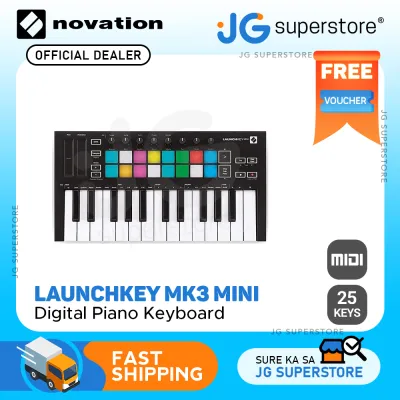
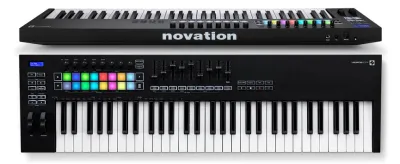
![Novation Launchkey Mini [MK3] — Portable 25-Key USB MIDI Keyboard Controller with DAW Integration Chord Mode and Arpeggiator — for Music Production](https://img.lazcdn.com/g/p/3eb4f9a298e9fd5f26cfbb25296ede87.png_400x400q80.png_.webp)
Prices are valid at publication and may change. Please refer to the product page for the latest price.
Desk Space and Physical Footprint
Before purchasing a new keyboard controller, you must carefully measure your available desk depth and width. A common mistake is overlooking how a new keyboard will interact with your existing gear. Your desk must comfortably accommodate not just the controller, but also your audio interface, studio monitors, laptop stand, and external displays.

In compact home studios, especially in urban apartments where space is at a premium, every centimeter counts. High humidity levels in tropical climates like the Philippines also mean you should leave enough clearance around your gear for proper airflow. This helps prevent moisture buildup and dust accumulation that can damage sensitive electronic contacts over time.
The three sizes represent distinct footprint categories. The 25-key model is ultra-compact, making it ideal for small writing desks, slide-out keyboard trays, or even working from a coffee table. It slides easily into a backpack, making it the go-to option for mobile producers who travel frequently or move between different project studios.
The 49-key model is the standard for dedicated studio desk integration. It fits comfortably in front of a computer monitor on a medium-sized desk without forcing you to push your computer keyboard and mouse into awkward, non-ergonomic positions.
The 61-key model, on the other hand, usually demands a dedicated keyboard stand or a large, professional workstation desk. It is a substantial piece of hardware that becomes the centerpiece of your studio, requiring a permanent home where it won’t be constantly moved.
Portability and transport weight are also key factors if you plan to take your controller to live gigs, band rehearsals, or collaborative writing sessions. While the 25-key version is light enough to carry all day without fatigue, the 61-key version is significantly heavier and bulkier, requiring a dedicated padded gig bag and a vehicle for easy transport.
Playing Style and Keybed Requirements
Your musical background and playing style should heavily influence your choice of key count. If you have formal piano training or find yourself naturally playing two-handed arrangements, a 25-key controller will feel incredibly restrictive. Playing a simple chord progression with your left hand while executing a melody line with your right hand is virtually impossible on a two-octave keyboard without constantly hitting the octave shift buttons.
For comfortable, expressive two-handed playing, a minimum of 49 keys is highly recommended. Meanwhile, 61 keys provides the freedom to explore complex classical, jazz, or progressive arrangements without running out of physical keys.
Beyond the number of keys, you must check the manufacturer’s specifications regarding key size and keybed action. While some ultra-portable controllers use mini-keys to save space, the larger models in this series feature full-size, velocity-sensitive keys. The physical feel of the keybed determines how expressively you can play virtual instruments like grand pianos, electric pianos, and orchestral strings.
Full-size keys allow for more natural finger placement and better control over velocity dynamics, which is crucial for capturing the subtle nuances of your performance. If you are accustomed to the weighted feel of an acoustic piano, keep in mind that these models feature synth-action keybeds, which are lighter and springier, optimized for fast synthesizer leads, drum programming, and organ parts.
The physical placement of essential performance controls like pitch bend and modulation wheels also varies across the sizes. On the ultra-compact 25-key model, these controls are often implemented as touch strips or placed above the keys to keep the unit’s width as narrow as possible. On the 49 and 61-key models, you will find traditional, physical pitch and mod wheels positioned to the left of the keybed, which is preferred by most keyboardists for its tactile feedback.
Production Workflow and Hardware Controls
A MIDI controller is not just a keyboard; it is the command center for your Digital Audio Workstation (DAW). The onboard controls—such as RGB pads, rotary knobs, and faders—directly dictate how much you can rely on the hardware versus constantly reaching for your computer mouse. However, these control layouts are not identical across all sizes of this specific series.
While all models typically feature velocity-sensitive RGB pads for drum programming and clip launching, physical faders are generally absent on the 25-key version due to space constraints. If your workflow involves riding faders to mix volume levels, control track pans, or automate synthesizer filters in real-time, you will want to opt for the 49 or 61-key models, which feature a dedicated bank of physical faders and buttons.
DAW integration is another critical aspect to verify. The controller is designed to integrate seamlessly with popular software like Ableton Live, Logic Pro, Cubase, and FL Studio. However, you should always consult the manufacturer’s official compatibility list to ensure your specific DAW and operating system version are fully supported.
Native integration allows the knobs, faders, and pads to automatically map to your software’s mixer, device parameters, and transport controls. If you choose a model size that lacks physical faders, you will have to rely on the rotary knobs or manual mouse movements for mixing tasks, which can slow down your production speed if you prefer a hands-on mixing experience.
Additionally, consider how you plan to use built-in performance features like the onboard arpeggiator, scale modes, and chord modes. These creative tools are incredibly powerful for both beginners who are still learning music theory and experienced producers looking for quick inspiration. Scale mode locks the keyboard to a specific musical key, preventing you from playing a wrong note, while chord mode allows you to trigger complex chords with a single key press.
These features are available across the range, but their usability is enhanced by a larger keybed. With more keys, you can easily split the keyboard or play melodies over a sustained chord pattern without running out of physical octaves.
Decision Framework: Finalizing Your Choice
To finalize your decision, it helps to apply a structured framework based on your strictest constraints:
- Choose the 25-key model if your budget is tight, or if you are working in a highly confined space like a bedroom corner or a shared living room. It provides all the essential MIDI programming tools in a highly portable, cost-effective package.
- Choose the 49-key model if you want a versatile, all-purpose studio workhorse that allows for two-handed playing, physical mixing control via faders, and seamless integration with your desk setup.
- Choose the 61-key model if you are a keyboard player first and a producer second, or if you refuse to compromise on octave range for live performances and complex studio tracking.
Identify your personal dealbreakers before committing to a purchase. For example, if you absolutely require physical faders for your mixing workflow, the 25-key model is immediately ruled out. Conversely, if you must fit your controller into a standard backpack for daily commuting on public transport, the 49 and 61-key models are out of the question.
Finally, always verify current local availability, warranty terms, and the specific software bundle included with your purchase through authorized local retailers. Software packages can change over time, and purchasing from an authorized dealer ensures you receive a valid license for any included DAWs or virtual instruments.
When planning your budget, remember to factor in any additional accessories you might need, such as a sturdy keyboard stand, a sustain pedal, or a high-quality dust cover to protect your investment from the humid, dusty conditions common in tropical environments. Allocating a portion of your ₱ budget to these protective accessories will ensure your controller remains in peak operating condition for years to come.
Frequently Asked Questions (FAQ)
Do I need a separate power supply for the Launchkey MK3?
Most modern MIDI controllers in this class, including this series, are designed to be USB bus-powered. This means they draw all the electrical power they need directly from the connected computer or laptop via the USB cable, eliminating the need for an external wall adapter.
However, if you are connecting the controller to an older laptop, a mobile device, or a complex setup with multiple USB peripherals, you should check the manufacturer’s manual for specific power draw limits. In setups with many power-hungry devices, using a high-quality, externally powered USB hub is highly recommended to ensure stable performance and prevent accidental disconnections during a session.
Can I use the Launchkey MK3 as a standalone instrument?
It is important to understand that MIDI controllers do not contain internal sound engines, speakers, or built-in instrument sounds. They do not generate audio on their own; instead, they send digital MIDI data—such as note pitches, velocity, and control movements—to an external device.
To hear any sound, you must connect the controller to a computer, tablet, or external hardware synthesizer that can interpret this MIDI data and translate it into audio. You will need a compatible DAW or virtual instrument software installed on your host device to play, record, and monitor your musical performances.

Community discussion
Share your experience or ask a question. Comments are reviewed before publication.