
Selecting your first electronic keyboard is a pivotal step in your musical journey, requiring a careful balance of cost, physical playability, and educational features. The Yamaha PSR-E283 is a highly visible contender in the entry-level market, designed specifically for absolute beginners who need an approachable, portable instrument. However, choosing the right keyboard depends heavily on your long-term learning goals, as certain design choices—such as the lack of touch-sensitive keys—can impact how quickly a student outgrows the instrument.
While the PSR-E283 excels as an affordable, lightweight tool for casual practice, self-guided learning, and basic music theory, it may not satisfy those preparing for formal classical training. Understanding how this model compares to other entry-level keyboards ensures you invest in an instrument that aligns with your specific practice habits, space constraints, and musical aspirations.
Quick Answer: Is the Yamaha PSR-E283 the Right Beginner Keyboard for You?
The Yamaha PSR-E283 is an excellent match for casual hobbyists, young children, and budget-conscious learners who want a reliable, self-contained instrument for home practice. Its primary appeal lies in its simplicity, lightweight design, and built-in educational tools like Quiz Mode, which make early music theory engaging without requiring constant connection to a tablet or computer. If your goal is to learn basic melodies, understand chord structures, or enjoy auto-accompaniment styles, this keyboard offers exceptional value within the budget tier of under ₱10,000.
Products mentioned in this guide
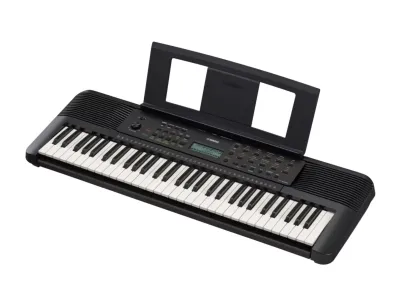
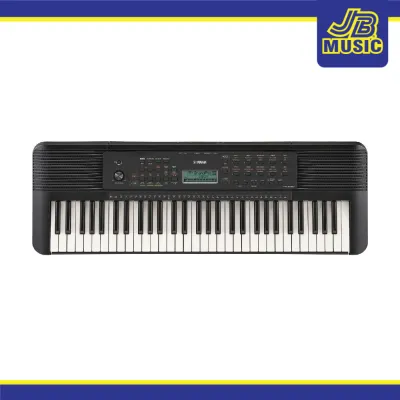
Prices are valid at publication and may change. Please refer to the product page for the latest price.
Conversely, you should look at alternative models if you are committed to formal piano lessons or want to develop expressive playing techniques. Because the PSR-E283 features non-touch-sensitive keys, it cannot replicate the dynamic volume changes of an acoustic piano. Serious students, intermediate players, or those following a structured classical curriculum should consider upgrading to a model with touch-sensitive keys, such as the Yamaha PSR-E383, or a fully weighted digital piano if budget and space permit.
Core Specifications: How the PSR-E283 Stacks Up
To understand where the Yamaha PSR-E283 sits in the broader market, it is helpful to compare its hardware specifications directly with closely related entry-level alternatives. These specifications dictate how many notes you can play simultaneously, the variety of sounds at your disposal, and how easily you can transport the instrument.

| Feature | Yamaha PSR-E283 | Casio Casiotone CT-S200 | Yamaha PSR-E383 |
|---|---|---|---|
| Number of Keys | 61 | 61 | 61 |
| Key Action | Non-touch-sensitive | Non-touch-sensitive | Touch-sensitive (3 levels + off) |
| Polyphony | 32-note | 48-note | 48-note |
| Built-in Voices | 410 Voices + 18 Drum/SFX kits | 400 Tones | 650 Voices |
| Accompaniment Styles | 150 Styles | 77 Rhythms | 260 Styles |
| USB Connectivity | USB Type-B (MIDI only) | Micro USB Type-B (MIDI only) | USB Type-B (MIDI + Digital Audio) |
| Amplifiers & Speakers | 2.5 W + 2.5 W (12 cm x 2) | 2.0 W + 2.0 W (13 cm x 6 cm x 2) | 2.5 W + 2.5 W (12 cm x 2) |
| Power Supply | PA-130 AC Adapter / 6 AA Batteries | AD-E95100L AC Adapter / 6 AA Batteries | PA-130 AC Adapter / 6 AA Batteries |
| Price Bracket (PHP) | Budget (Under ₱10,000) | Budget (Under ₱10,000) | Mid-Entry (₱10,000 to ₱15,000) |
Polyphony is one of the most critical technical specifications for a beginner keyboard. It refers to the maximum number of individual notes the keyboard’s sound engine can produce at the exact same time. The PSR-E283 features 32-note polyphony, which is sufficient for simple melodies and basic two-handed chord playing. However, if you use the sustain pedal or play along with dense auto-accompaniment styles, notes can begin to cut off abruptly as the limit is reached. In comparison, the Casio CT-S200 and the step-up Yamaha PSR-E383 offer 48-note polyphony, providing a more comfortable buffer for layered performances.
Voice and style variety also play a significant role in keeping a beginner motivated. The PSR-E283 comes equipped with 410 high-quality voices, allowing you to experiment with various instruments, from traditional grand pianos to brass, woodwinds, and synthesizers. While this selection is extensive, the step-up PSR-E383 expands this library to 650 voices, offering more refined acoustic piano samples and modern synth textures for players who want to explore diverse genres.
Key Action and Playability: What Beginners Need to Know
The physical feel of the keys is the most important factor in developing proper finger strength and playing technique. Keyboards generally fall into three categories: synth-action (light, springy, and unweighted), semi-weighted or touch-sensitive (which respond to the speed or force of your keypress), and fully weighted (which mimic the heavy, hammer-action feel of an acoustic piano).
The Yamaha PSR-E283 features 61 full-sized, synth-action keys that are completely non-touch-sensitive. This means that whether you strike a key with gentle pressure or press it down with force, the keyboard produces the exact same volume level. For very young children or absolute beginners, this can actually make early practice less frustrating, as it ensures a consistent, clean volume output while they focus entirely on finding the correct notes.
However, the lack of touch sensitivity presents a significant hurdle as your skills progress. Expressive music relies heavily on dynamics—the ability to play softly (piano) or loudly (forte) to convey emotion. If you practice exclusively on a non-touch-sensitive keyboard, you will not develop the finger control required to play expressively. Transitioning to an acoustic piano or a touch-sensitive keyboard later will require you to relearn your finger pressure habits, which can be a difficult adjustment.
If you plan to follow a structured piano curriculum, taking formal lessons from a teacher, you should prioritize a keyboard with touch sensitivity. Within the entry-level landscape, models like the Casio Casiotone CT-S300 or the Yamaha PSR-E383 serve as the logical next step up, offering velocity-sensitive keys that allow for dynamic expression while remaining lightweight and affordable.
Built-in Features and Learning Tools
For self-guided learners, built-in educational tools can make the difference between consistent daily practice and an instrument that sits unused in a closet. Yamaha has a long history of integrating structured lesson suites into their entry-level instruments, and the PSR-E283 features several tools designed to teach music fundamentals directly from the hardware interface.
The standout educational feature of the PSR-E283 is Quiz Mode, which turns ear training into an interactive game. The keyboard plays a note or sound effect and prompts you to identify the correct key, helping to develop pitch recognition and active listening skills. Additionally, the Lesson Lite system offers a three-step learning process (Listening, Timing, and Waiting) using the 122 built-in songs. The keyboard pauses its accompaniment and waits for you to play the correct note, allowing you to learn new pieces at your own comfortable pace.
Another helpful feature for beginners is Smart Chord technology. This function allows you to play musically correct chords using just a single finger, making it easy to enjoy the full sound of the 150 built-in auto-accompaniment styles without needing to master complex left-hand chord shapes first. As your skills improve, you can switch back to standard multi-finger chord playing to practice traditional harmony.
Many modern entry-level keyboards rely heavily on external mobile applications or subscription-based software for their learning paths. While app integration can be highly visual, it also introduces distractions and requires a tablet or smartphone to be constantly mounted on the music stand. The PSR-E283 keeps its learning tools entirely onboard, which is highly practical for families who want to limit screen time, or for players practicing in areas with spotty internet connectivity.
Sound Quality and Connectivity Options
An instrument’s audio output and connectivity options dictate where and how you can practice. The PSR-E283 is equipped with a 2.5W + 2.5W amplifier system driving two 12-centimeter speakers. This setup delivers clear, balanced sound that easily fills a standard bedroom or small living room for personal practice, utilizing Yamaha’s Advanced Wave Memory (AWM) Stereo Sampling to deliver realistic acoustic piano tones.
For quiet practice, the keyboard features a standard 1/4-inch stereo headphone jack. Plugging in headphones automatically mutes the built-in speakers, allowing you to practice late at night or in shared living spaces without disturbing others. This port also doubles as an audio output if you ever need to connect the keyboard to an external amplifier or a portable PA system for a small performance.
Beyond basic audio output, the PSR-E283 offers several essential ports for expanded functionality:
- AUX IN (3.5mm Stereo Mini Jack): This port allows you to connect a smartphone, tablet, or MP3 player using an auxiliary cable. You can stream backing tracks, metronome apps, or your favorite songs directly through the keyboard’s speakers, allowing you to play along in real time.
- Sustain Pedal Jack (1/4-inch TS): Connecting a standard sustain pedal (usually sold separately) is essential for playing legato passages smoothly. It is highly recommended to purchase a basic sustain pedal alongside the keyboard to practice proper pedaling technique early on.
- USB TO HOST (USB Type-B): This port allows you to connect the keyboard to a computer, tablet, or smartphone to transmit MIDI data. This connection lets you use the PSR-E283 as a basic MIDI controller for educational software, interactive learning apps, or basic music notation programs.
It is important to note a key limitation regarding the USB TO HOST port on the PSR-E283. Unlike higher-tier models such as the PSR-E383, the PSR-E283 only transmits MIDI data, not digital audio. If you want to record the actual instrument sounds of your keyboard directly into a computer program or digital audio workstation (DAW) via a single USB cable, you will need a step-up model that supports built-in USB audio interfacing. With the PSR-E283, recording the actual keyboard voices requires running an analog cable from the headphone output to an external audio interface.
Making the Final Decision: Which Keyboard Should You Choose?
To finalize your purchase, evaluate your specific learning goals, budget, and physical practice environment. Use the following decision framework to identify which path best suits your musical needs.
- Choose the Yamaha PSR-E283 if: You are looking for a reliable, lightweight, and highly portable instrument for a young child or a casual adult hobbyist. It is ideal if you want a straightforward interface with excellent built-in ear training games (Quiz Mode) and onboard lessons that do not require an internet connection or an external tablet. It is also the perfect choice if you want the prestigious Yamaha piano sound engine while staying strictly within a budget of under ₱10,000.
- Choose an alternative entry-level keyboard if: You are preparing for formal classical piano lessons, as you will quickly outgrow a keyboard without touch-sensitive keys. If you want to develop proper expressive dynamics, look for a model with touch sensitivity like the Casio Casiotone CT-S300 or the Yamaha PSR-E383. If you have the budget and space, and are fully committed to long-term piano study, investing in a 10,000-to-15,000 PHP digital piano with weighted keys is the most future-proof option.
- Verify first if: You are buying this instrument for a specific school music curriculum or private lesson program. Many instructors and schools require a minimum of 61 touch-sensitive keys or a specific sustain pedal compatibility. Additionally, always verify the package inclusions with your local retailer before purchasing; ensure the package includes the essential PA-130 AC power adapter and a music rest, as accessory configurations can vary by retail bundle.
Frequently Asked Questions (FAQ)
Does the Yamaha PSR-E283 have weighted keys?
No, the Yamaha PSR-E283 does not have weighted keys. It features 61 unweighted, synth-action keys that do not offer touch sensitivity or velocity response. If you require a realistic acoustic piano feel with weighted keys to build finger strength for classical training, you should look for a dedicated digital piano with graded hammer-action keys, which are typically found in higher price brackets.
Can I connect the PSR-E283 to a computer or tablet?
Yes, you can connect the PSR-E283 to a computer, tablet, or smartphone using the built-in USB TO HOST port, which requires a standard USB Type-B to Type-A or Type-C cable. This connection allows you to transmit MIDI data to control educational software, music learning apps, or digital notation programs. However, please note that this port does not support digital audio transfer; it only transmits MIDI notes, meaning you cannot stream the keyboard’s internal instrument sounds directly to your device over the USB connection.
Community discussion
Share your experience or ask a question. Comments are reviewed before publication.