
Choosing a MIDI keyboard in the Philippines often comes down to balancing a strict budget against the desire for reliable performance and rich features. Worlde MIDI keyboards have gained traction as highly accessible, ultra-budget options that pack an impressive number of physical controls—such as pads, knobs, and faders—into low-cost hardware. However, when compared to established entry-level giants like Akai and Arturia, the trade-offs become clear. While Worlde provides an affordable entry point for beginners looking to learn the basics of music production, Akai and Arturia offer significantly better build quality, more consistent keybed action, robust software bundles, and seamless integration with digital audio workstations (DAWs). Deciding between them requires evaluating whether you want to maximize physical controls per peso or invest in a more polished, durable ecosystem that will support your creative workflow over the long term.
Defining the Comparison: Worlde vs. Established Entry-Level Brands
To make an informed decision, it is essential to understand where these brands sit in the music gear landscape. Worlde operates primarily in the ultra-budget or white-label manufacturing space. This means they focus on producing high volumes of controllers with high control density—meaning you get many physical inputs like faders and pads—at the lowest possible price point. In contrast, brands like Akai and Arturia target the established entry-level tier. While their entry-level lines, such as the Akai MPK Mini or Arturia MiniLab series, are designed to be accessible, they are backed by decades of brand heritage, dedicated engineering teams, and robust quality control standards.
This difference in market positioning translates directly into real-world trade-offs. Opting for an ultra-budget brand like Worlde yields immediate upfront cost savings, allowing you to allocate more of your budget to other studio essentials. However, these savings often come at the expense of long-term reliability, customer support accessibility, and driver stability. Established brands invest heavily in maintaining firmware updates and ensuring their devices remain compatible with evolving operating systems. With ultra-budget options, you may encounter situations where driver support is limited, or customer service channels are difficult to reach if a hardware defect arises.
Products mentioned in this guide
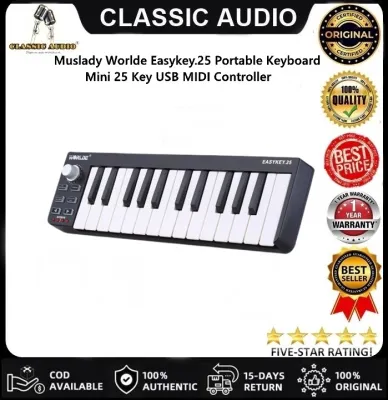
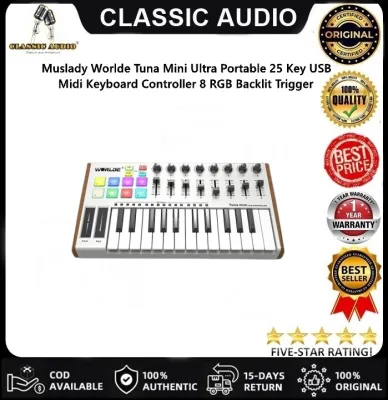
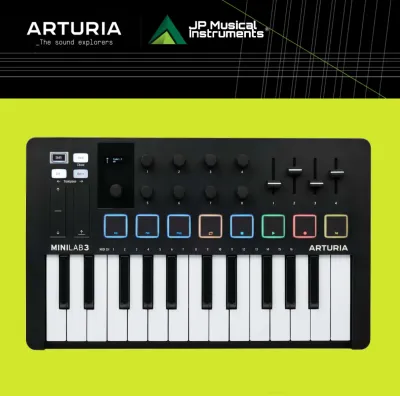
Prices are valid at publication and may change. Please refer to the product page for the latest price.
Furthermore, local buyers should carefully verify the exact model generation when comparing these options. The used and clearance markets in the Philippines frequently feature older generations of established controllers, such as an older Akai MPK Mini MKII or an early Arturia MiniLab. These older, high-quality models often retail at prices that compete directly with brand-new Worlde controllers. Understanding whether you are comparing a brand-new ultra-budget device with a discounted, previous-generation industry standard is a crucial first step in evaluating your options.
Key Comparison Dimensions for MIDI Controllers
When shopping for a MIDI controller, it is easy to fall into the trap of comparing raw specifications on paper. A spec sheet might show that two keyboards both feature 25 keys, eight drum pads, and eight rotary knobs, leading you to assume they offer identical utility. However, a MIDI controller is a tactile interface; its value lies entirely in how it feels under your fingers and how reliably it translates your physical performance into digital data.

To truly understand what you are paying for, you must look beyond the numbers and evaluate the underlying mechanics, material choices, and software ecosystems. A controller that constantly drops connection or features keys that stick in high-humidity environments will hinder your creative flow, regardless of how many knobs it has. Let us examine the critical physical and digital dimensions that distinguish these brands.
Build Quality, Key Action, and Hardware Controls
The physical construction of a MIDI keyboard dictates both its playability and its lifespan, especially in the tropical climate of the Philippines. High humidity and ambient heat can accelerate the wear of plastic components, adhesive backings, and internal contact strips. When evaluating key action, you will generally choose between mini-keys and full-size keys, typically utilizing synth-action mechanics. Worlde controllers often feature lighter, springier keybeds that some users find clicky or inconsistent in their velocity response. This means playing a soft melody might accidentally trigger a loud note, or vice versa. In comparison, Arturia is widely recognized for its high-quality slim keys, which offer a more substantial, resistive travel that mimics the feel of professional synthesizers, while Akai offers a snappy, highly responsive mini-keybed favored by electronic music producers.
The materials used in the chassis and control interfaces also vary significantly. Budget controllers are universally encased in plastic, but the grade of plastic matters. Established brands typically use high-impact ABS plastic, sometimes reinforced with internal metal plates to prevent chassis flex when pressing down hard on drum pads. Ultra-budget models may use thinner, lighter plastics that flex under pressure. Additionally, pay close attention to the tactile feel of the pads and knobs. Drum pads on established controllers are designed to capture subtle velocity nuances, which is essential for programming realistic drum patterns. Cheaper pads may require you to strike them excessively hard to register a hit, leading to finger fatigue. Knobs and faders on ultra-budget units can also exhibit physical play or wobble, making precise parameter adjustments difficult.
Connectivity is another hardware aspect that requires careful verification from the manufacturer’s official specification sheet. Modern controllers are increasingly adopting USB-C connections, which offer sturdier physical ports and more reliable power delivery. Some older or ultra-budget models still rely on older Micro-USB or Mini-USB ports, which are notoriously fragile and prone to breaking if the cable is frequently plugged and unplugged. Furthermore, if you plan to connect your keyboard to external hardware synthesizers, you must check for physical 5-pin MIDI Out ports or 3.5mm TRS MIDI jacks, features that are rarely found on basic ultra-budget models but are occasionally present on slightly higher-tier entry-level controllers.
Software Bundles and DAW Integration
The true cost of a MIDI keyboard is often offset by the software bundle included in the box. Established brands leverage their industry partnerships to provide highly valuable software packages that can jumpstart a beginner’s production journey. For example, purchasing an Arturia controller typically grants access to Analog Lab, a massive library of premium synthesizer and keyboard sounds, alongside introductory versions of popular DAWs like Ableton Live Lite. Akai similarly bundles MPC Beats and high-quality virtual instruments. These are not mere trial versions; they are fully functional, professional-grade tools that would cost a significant amount if purchased separately. Ultra-budget alternatives like Worlde rarely include these premium software suites, often providing either no software at all or basic, open-source utility programs. If you do not already own a collection of virtual instruments and a preferred DAW, the cost of acquiring them separately can quickly wipe out any savings gained from buying a cheaper keyboard.
Beyond the software bundle, how the controller communicates with your DAW is critical to a smooth workflow. Established controllers feature deep, native integration with major DAWs. This means that when you plug in the keyboard, the software automatically recognizes the device and maps the knobs, faders, and transport controls to their corresponding functions in the software without requiring manual setup. This plug-and-play experience is powered by dedicated integration scripts written by the manufacturers.
With ultra-budget controllers, you are much more likely to face a manual configuration process. You will need to use the DAW’s MIDI learn function to manually assign every single knob and fader to the parameters you want to control. While this is a valuable learning experience, it can be tedious and frustrating for beginners who simply want to start making music. To customize these settings permanently, you must rely on the manufacturer’s official editor software. Before purchasing, visit the brand’s website to verify that their editor software is compatible with your current operating system version, as outdated editor tools can make customizing pad notes and MIDI channels incredibly difficult.
Evaluating Price-to-Value Ratios in the Local Market
Navigating the local market in the Philippines requires a practical approach to pricing, availability, and long-term ownership costs. When comparing prices in Philippine Pesos (₱), it is vital to look at authorized local music distributors and reputable e-commerce platforms rather than relying solely on international retail listings. While an ultra-budget keyboard might look incredibly cheap online, shipping fees, import duties, and local dealer markups can alter the final price. Always cross-reference prices across multiple local sellers to ensure you are getting a fair deal, and be cautious of unauthorized gray-market listings that offer lower prices but omit local warranty coverage.
Warranty and repairability are critical factors that many buyers overlook. If an established controller from a brand like Akai or Arturia experiences a hardware failure, authorized local distributors often provide repair services, replacement parts, or warranty exchanges. Conversely, ultra-budget keyboards are frequently treated as disposable items. If a key stops working or a USB port breaks on a low-cost controller, finding official replacement parts or a technician familiar with the brand can be nearly impossible. You may end up having to replace the entire unit, which ultimately costs more than investing in a sturdier controller from the start.
Additionally, factor in the cost of necessary accessories that may not be included in the box. A complete setup often requires a sustain pedal, a sturdy USB cable of appropriate length, a protective sleeve for travel, or a keyboard stand. Some budget bundles might omit high-quality cables or essential adapters, forcing you to make separate purchases. When calculating the total investment, add the cost of these accessories to the base price of the keyboard to get an accurate picture of the overall value proposition.
Decision Framework: Which Brand Fits Your Setup?
To finalize your decision, it helps to align your purchase with your specific production environment, technical skills, and long-term goals. There is no single option that suits every musician, but analyzing your workflow will point you toward the right choice.
Choose Worlde if:
- You are working with a highly restricted budget and need to minimize your upfront expenditure.
- Your primary goal is basic note entry, such as inputting chords or simple melodies into a DAW, where key velocity sensitivity and advanced physical playability are not critical.
- You need a highly portable, lightweight controller for casual travel or mobile sketching, where the risk of loss or damage makes a cheaper, easily replaceable device more practical.
- You enjoy customizing your setup and do not mind spending time manually mapping MIDI controls and configuring editor software to work with your DAW.
Choose Akai or Arturia if:
- You prioritize a tactile, expressive playing experience with consistent keybed action and highly sensitive drum pads for finger drumming.
- You want a seamless, plug-and-play workflow with native DAW integration that minimizes technical setup time and lets you focus entirely on creating music.
- You do not already own a collection of virtual instruments and want to take advantage of high-value, premium software bundles like Analog Lab or Ableton Live Lite.
- You view your MIDI keyboard as a long-term investment and want a durable chassis, reliable firmware updates, and access to local warranty support in the Philippines.
Verify first if:
- You are considering buying a second-hand controller from an established brand, as you must carefully inspect the hardware for wear and confirm whether the bundled software licenses can be transferred to your account.
- You are looking at alternative budget brands available locally, ensuring you research their driver stability and check user forums for common hardware complaints before committing to a purchase.
Frequently Asked Questions (FAQ)
Do Worlde MIDI keyboards work seamlessly with mobile DAWs and tablets?
Most Worlde MIDI keyboards are USB class-compliant, meaning they use standard drivers that allow them to transmit basic MIDI note data to iOS and Android devices without requiring custom software. However, seamless operation is not always guaranteed. The primary hurdle when connecting to mobile devices is power consumption. Because these keyboards are bus-powered, they draw electricity directly from the host device. Smartphones and tablets often limit the power output of their ports, which can cause the keyboard to fail to turn on or repeatedly disconnect. To resolve this, you will likely need to use a powered USB hub or an official camera adapter kit that allows you to supply external power to the setup. Additionally, advanced hardware features like built-in arpeggiators, scale modes, or custom pad mappings may not function correctly within mobile DAWs, as these apps often lack the advanced MIDI routing capabilities found on desktop computers.
Is it worth buying a used Akai or Arturia instead of a new Worlde?
Buying a used controller from an established brand can be an excellent way to acquire high-quality hardware on a budget, but it comes with distinct risks. Physically, you must thoroughly inspect the unit before purchasing. Test every single key to ensure consistent velocity response, check that the drum pads have not lost their sensitivity or become sticky, and gently wiggle the USB port to verify it is physically secure. The biggest risk, however, lies in the software. Bundled software licenses, such as DAWs and virtual instruments, are typically registered to the original owner’s account. Unless the seller goes through the official license transfer process with the manufacturer, you will lose access to these valuable bundles, significantly reducing the overall value of the purchase. Finally, remember that a used purchase is almost always an \”as-is\” transaction without warranty protection, whereas a new budget keyboard will at least offer some form of initial seller warranty.
Community discussion
Share your experience or ask a question. Comments are reviewed before publication.