
Entering the vibrant world of K-pop as a new NCTzen is an exciting journey, and nothing symbolizes your entry into the fandom quite like holding your very own official NCT 127 lightstick. Known affectionately as the “Neobong” due to its distinct neon-green glow and bold square design, this fanlight is more than just a collectible; it is an essential tool for participating in the famous “green ocean” during live concerts. However, as the group has evolved, different versions of the official lightstick have been released, leaving many first-time buyers wondering which version is the right investment.
Choosing the correct version requires understanding the differences in design, checking compatibility with modern concert synchronization technologies, and knowing how to navigate the purchasing process safely. Because official merchandise undergoes periodic updates to improve hardware and software integration, buying the wrong version could mean missing out on central control features at upcoming live events. By focusing on official specifications, verifying authenticity, and selecting reliable purchase channels, you can ensure your lightstick is fully functional and ready for the next concert.
Identifying Official NCT 127 Lightstick Versions
To make an informed decision, you must first learn how to identify the official versions of the NCT 127 lightstick and understand their technical specifications. SM Entertainment periodically updates fanlight designs to introduce better connectivity, updated aesthetics, and improved battery efficiency. The most reliable way to find accurate information on the current active version is to visit the official SMTOWN &STORE or the manufacturer’s official website, where detailed product listings and release announcements are posted.
Products mentioned in this guide
Prices are valid at publication and may change. Please refer to the product page for the latest price.
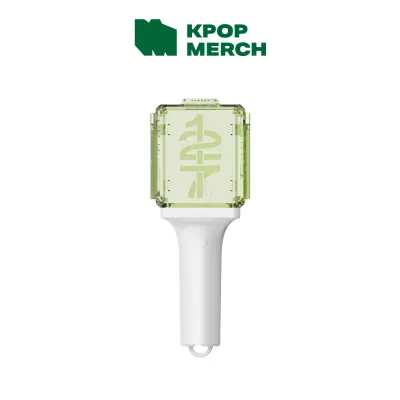
When comparing different versions, pay close attention to the physical design elements and packaging. The classic design features a prominent square head containing the geometric “NCT” emblem, a sleek white handle, and a single power button. Newer iterations may feature subtle modifications to the emblem’s mounting, a more ergonomic handle grip, or updated branding on the packaging. Official packaging typically includes the lightstick itself, a branded wrist strap, a comprehensive user manual, and occasionally exclusive collectible photocard sets. Comparing these physical components against the official product photos on authorized distributor sites will help you identify which version you are looking at.
Beyond aesthetics, reviewing the official specification sheets is crucial for understanding operational requirements. Most versions of the lightstick are powered by three AAA alkaline batteries, which are housed in a removable cartridge inside the handle. The spec sheet will also detail the available operational modes, which generally include a steady light, a slow blink, a rapid flicker, and the wireless control mode used during concerts. Understanding these basic functions ensures you know exactly what to expect from the hardware before you make a purchase.
How to Verify Authenticity and Avoid Fakes
The popularity of NCT 127 has unfortunately led to a market flooded with counterfeit lightsticks. For a first-time buyer, distinguishing a genuine Neobong from a high-quality fake can be challenging, but protecting your investment requires careful inspection. The first line of defense is the packaging. Genuine lightsticks always feature an official SM Entertainment holographic sticker on the box, which reflects light in a distinct, multi-colored pattern and includes a unique serial number. If this sticker is missing, blurry, or lacks the official holographic depth, the product is likely counterfeit.

Next, examine the physical build quality of the device. Genuine lightsticks are manufactured using high-grade, durable plastics that feel sturdy and well-balanced. The seams where the plastic parts meet should be smooth and flush, without any rough edges or visible glue residue. The battery compartment should open smoothly, and the internal spring contacts should be firmly aligned so that the batteries do not rattle when the handle is shaken. Counterfeit versions often use cheaper, lightweight plastics that may emit a strong chemical odor, and they frequently suffer from loose internal components or misaligned logos.
When browsing online listings, be alert to common warning signs of counterfeit products. Unusually low prices are a major red flag; if a listing is priced significantly below the standard retail rate found on official stores, it is almost certainly a fake. Avoid sellers who rely solely on generic stock images rather than providing clear, high-resolution photos of the actual product and its packaging. Finally, always cross-reference the product codes and serial numbers printed on the box and the user manual with the manufacturer’s official authentication guidelines, which are regularly updated on their customer support portals.
Checking App Compatibility and Concert Functions
One of the most exciting aspects of owning an official lightstick is experiencing the central control feature during live concerts. Through wireless synchronization, the venue’s production team can control the color, brightness, and flashing patterns of thousands of lightsticks simultaneously, turning the audience into a massive, coordinated light show. However, this feature relies heavily on modern Bluetooth technology and software compatibility, making it essential to verify these functions before buying.
Before finalizing your purchase, download the official companion app, such as the SMTOWN lightstick application, on your smartphone. Check the app store listing to review the supported device list and ensure your phone’s operating system meets the minimum requirements. The app is used not only for pairing your lightstick but also for installing critical firmware updates. Manufacturers frequently release software updates to ensure the lightstick can communicate with the specific wireless frequencies used at different concert venues, so a version that cannot connect to the app will not sync properly during a show.
To verify the Bluetooth functionality of your lightstick, consult the user manual for the pairing instructions. This process typically involves holding down the power button for a few seconds until the light flashes blue, indicating that it is in pairing mode and ready to connect to your phone. Once connected, you can test the color customization features within the app to ensure the internal LEDs are functioning correctly. At the concert venue, you will need to use the app to register your ticket seat number to your lightstick, allowing the central control system to locate your device and integrate it into the synchronized performance.
Evaluating Purchase Channels and Availability
Finding a reliable source to purchase your lightstick is just as important as choosing the right version. The safest and most reliable option is to buy directly from official brand stores like the SMTOWN &STORE, the SM Global Shop, or authorized local entertainment merchandise retailers. Purchasing through these official channels guarantees authenticity, ensures you receive a brand-new product with all included accessories, and provides access to reliable customer support if you encounter any manufacturing defects.
However, because official stores often sell out quickly during comeback seasons or tour announcements, you may need to explore general e-commerce platforms. When doing so, look for preferred sellers with high ratings, positive feedback, and a proven history of selling authentic K-pop merchandise. Read through verified buyer reviews carefully, looking for detailed feedback and photos uploaded by other customers. Avoid sellers with a history of complaints regarding counterfeit items, damaged packaging, or poor communication, and always check the platform’s return and refund policies to ensure you are protected if the item arrives defective.
When comparing prices across different sellers, always calculate the total cost in ₱ to avoid unexpected expenses. This means factoring in the base price of the lightstick, international or local shipping fees, potential import duties, and any handling charges. A listing that appears cheaper at first glance may end up costing more in ₱ once shipping and customs fees are calculated at checkout. Additionally, pay close attention to the estimated delivery times; shipping from overseas can take several weeks, so make sure to order your lightstick well in advance of any scheduled concert dates to allow for potential shipping delays.
Frequently Asked Questions (FAQ)
How do I properly store and maintain the lightstick when not in use?
Proper maintenance is essential for preserving the physical condition and electronic functionality of your lightstick, especially in tropical climates like the Philippines where high humidity and heat are common. The most critical step is to remove the AAA batteries immediately after every use or before storing the device for more than a few days. Leaving batteries inside the compartment can lead to chemical leakage, which causes rapid corrosion of the metal contacts and can permanently ruin the internal circuitry. Store the lightstick in its original packaging box or a dedicated padded pouch to protect it from dust, scratches, and accidental impacts. Keep the storage area cool, dry, and completely out of direct sunlight, as prolonged exposure to heat and UV rays can warp the plastic housing and fade the iconic neon-green color.
What should I do if the lightstick fails to connect to the official app?
If your lightstick fails to connect to the official companion app, follow a systematic troubleshooting sequence to resolve the issue. First, replace the existing batteries with a fresh set of high-quality alkaline batteries, as low voltage is the most common cause of Bluetooth pairing failures even if the light still turns on. Next, restart your smartphone, toggle your Bluetooth settings off and on, and ensure that the companion app has been granted all necessary permissions, including location services and Bluetooth access, in your phone’s system settings. If the connection still fails, try uninstalling and reinstalling the app to ensure you are running the latest version, and check for any available firmware updates. If you have completed all troubleshooting steps and the lightstick still refuses to connect, and you are certain the device is an official product, contact the authorized retailer where you purchased it to inquire about warranty support or replacement options.
Community discussion
Share your experience or ask a question. Comments are reviewed before publication.