
Choosing your first piece of music playback or mixing equipment can feel overwhelming, especially when navigating the differences between traditional vinyl turntables and modern digital setups. If you are looking at the brand Hercules, the most important initial realization is that this manufacturer is widely recognized for its beginner-friendly digital DJ controllers rather than traditional analog vinyl turntables. Deciding which model to start with depends entirely on whether your goal is to play physical vinyl records for casual listening or to learn the art of digital DJing using software on a computer or mobile device.
By understanding the distinct equipment categories, comparing the entry-level features of available controllers, and verifying compatibility requirements, you can make an informed decision that aligns with your budget and learning goals. This guide provides a clear breakdown of what Hercules offers, how to evaluate their beginner-oriented features, and how to set up your gear for the first time.
Clarifying Your Goal: Vinyl Record Player vs. DJ Controller
Before investing in any equipment, you must determine whether you want to interact with physical media or digital files. An analog turntable is a dedicated record player designed to spin physical vinyl records, using a stylus to read the grooves and send an analog audio signal to an amplifier and speakers. This setup is ideal for music collectors, audiophiles, and those who appreciate the tactile, ritualistic experience of playing physical albums.
Products mentioned in this guide
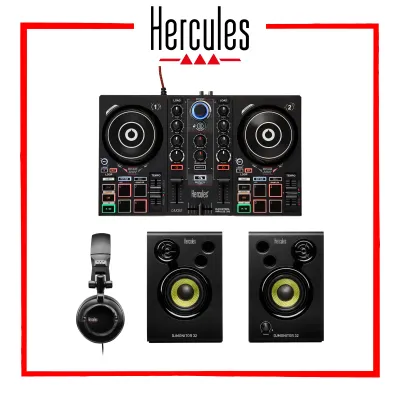
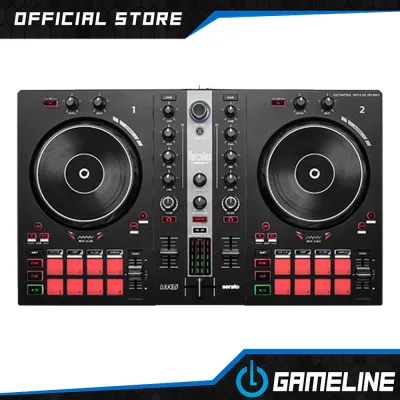
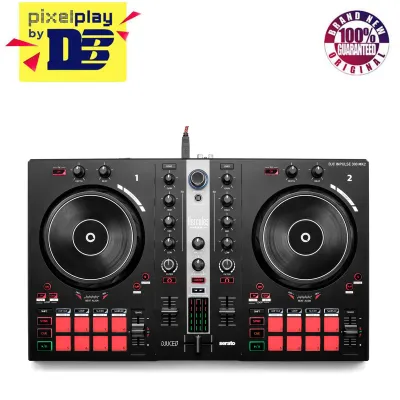
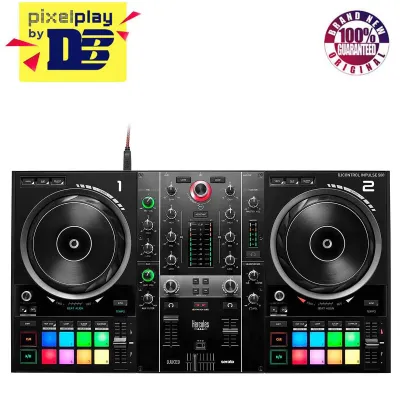
Prices are valid at publication and may change. Please refer to the product page for the latest price.
In contrast, a DJ controller is a digital MIDI control surface that connects to a computer, tablet, or smartphone. It does not play physical records; instead, it allows you to manipulate digital audio files (such as MP3s, WAVs, or streaming tracks) using DJ software. The jog wheels, faders, and buttons on the controller send commands to the software, which performs the actual audio processing.
Hercules primarily manufactures digital DJ controllers, such as their popular DJControl Inpulse series, rather than traditional analog turntables. If your goal is to mix tracks, transition between songs, and learn performance techniques using a digital library, a Hercules controller is highly suitable. However, if you want to sit back and listen to physical vinyl records, you will need to look for a dedicated analog turntable from a different manufacturer.
To confirm which equipment type fits your needs, consider this quick checklist:
- Choose an analog turntable if you want to collect physical vinyl records, enjoy high-fidelity analog listening, or learn traditional vinyl scratching.
- Choose a digital DJ controller if you want to mix digital music files, learn beatmatching and transitions, use performance effects, and keep your music library stored on a computer or mobile device.
Comparing Entry-Level Hercules Models for Beginners
If you decide that a digital DJ controller fits your goals, Hercules offers several entry-level models designed to accommodate different budgets and skill levels. These models are generally categorized into tiers based on their physical size, control layout, and built-in hardware features. Understanding these differences will help you choose the right model for your workspace and learning pace.

At the most basic level, compact and ultra-portable controllers offer a stripped-down layout with smaller jog wheels and a limited number of performance pads. These models are highly convenient for those with limited desk space or those who want a highly portable setup to practice on the go. However, the smaller controls can make precise adjustments more challenging, and they may lack dedicated physical knobs for essential functions like mid-range equalization or individual channel volume.
Standard and advanced entry-level models offer larger jog wheels, which provide a more realistic feel and greater precision when nudging tracks or practicing basic scratches. These models typically feature eight performance pads per deck instead of four, allowing you to trigger hot cues, loops, samples, and hardware effects more dynamically. They also include built-in audio interfaces with dedicated master outputs and headphone jacks, which are essential for pre-listening to your next track before mixing it into the main speakers.
One of the most valuable aspects of beginner-oriented Hercules controllers is the inclusion of hardware-based learning features, such as the Beatmatch Guide. This system uses built-in light guides—specifically red and blue LED arrows next to the tempo faders and jog wheels—to visually prompt you on how to adjust your controls. If a track is too slow or out of alignment, the lights show you exactly which way to move the fader or turn the jog wheel, helping you train your ears and build muscle memory for manual beatmatching.
Physical footprint and build materials are also critical considerations, especially in tropical climates like the Philippines. Entry-level controllers are typically constructed with a plastic chassis to keep them lightweight and affordable. High humidity, dust, and salty coastal air can affect electronic components over time, so a compact footprint is advantageous because it allows you to easily store the controller in a protective sleeve, drawer, or dust cover when not in use. Ensure the rubberized performance pads and plastic knobs are kept clean and dry to maintain their responsiveness.
Essential Specifications to Verify Before Purchase
To ensure a smooth setup experience, you must verify several technical specifications on the manufacturer’s official product page before making a purchase. Operating system compatibility is the first critical check. Ensure the included DJ software (such as DJUCED or Serato DJ Lite) is fully compatible with your computer’s operating system version, processor, and available RAM. Running DJ software on an unsupported or underpowered computer can lead to audio dropouts, software crashes, and frustrating latency issues.
Next, examine the physical audio output connections on the controller. Most entry-level models feature RCA outputs or a 3.5mm mini-jack for the master output. You must match these connections to your existing active speakers or home audio system. If your speakers only accept standard RCA inputs and the controller only outputs via a 3.5mm jack, you will need to purchase a compatible adapter cable. Additionally, verify that the headphone output matches your monitoring headphones, as some controllers use a 3.5mm jack while others use a larger 6.35mm jack.
Finally, review the power requirements of the unit. Many beginner-friendly controllers are USB bus-powered, meaning they draw all necessary electrical power directly from your computer through the USB connection. This simplifies your setup by eliminating the need for an extra wall outlet. However, if you are using an older laptop or connecting through an unpowered USB hub, the port may not supply enough power, leading to connectivity issues. Larger, more advanced controllers may require an external power adapter, which you must factor into your cable management and performance setup.
How to Decide: Condition-Based Selection Framework
To make your final decision, evaluate your goals, space constraints, and budget against the following condition-based scenarios:
- Choose a basic, ultra-portable controller if your primary goal is to minimize your initial budget in ₱, learn the absolute fundamentals of digital mixing, and practice in a highly confined space. This option is ideal for testing your interest in DJing without a significant financial commitment.
- Choose a mid-tier or advanced entry-level controller if you want a layout that closely mimics professional club equipment, require dedicated hardware controls for effects and equalization, need eight performance pads per deck for creative mixing, and plan to connect your setup to larger external speakers for small gatherings.
- Stop and look for a different brand if you strictly want to play physical vinyl records, appreciate analog sound quality, or want to learn traditional vinyl turntablism. A digital DJ controller cannot read physical vinyl grooves, so you should redirect your search toward dedicated analog belt-drive or direct-drive turntables.
Setup and First Steps for New Users
Once you have selected and unboxed your equipment, proper physical setup is essential to protect your gear and ensure optimal performance. Place your controller on a stable, level surface that is free from excessive vibrations. In tropical environments, avoid placing your setup near open windows where sudden rain showers, high humidity, or direct sunlight could damage the plastic casing and internal circuitry. Keeping the unit away from heavy speaker vibrations also prevents accidental jog wheel movement during playback.
Before plugging in the controller, visit the manufacturer’s official website to download the latest version of the designated DJ software. Register your hardware to unlock the included software license, and install any necessary audio drivers or firmware updates. Installing these updates before your first session prevents software conflicts and ensures the controller communicates perfectly with your computer.
After installing the software, connect your headphones to the front headphone jack and your active speakers to the rear master outputs. Open the software settings and navigate to the audio routing menu. Ensure the master output is routed to your external speakers and the cue or monitoring channel is routed to your headphones. Correct routing is essential to ensure you can preview and beatmatch your next track in your headphones without the audience hearing it through the main speakers.
Frequently Asked Questions (FAQ)
Do I need to buy separate speakers for a Hercules controller?
Yes, in most cases you will need external active speakers or a home stereo system. While some ultra-compact controllers can route audio through your laptop’s built-in speakers, the sound quality and volume are generally insufficient for mixing. Most entry-level controllers require external active speakers (speakers with their own built-in amplifier) to deliver clear sound. Always check the output ports on the back of your controller to ensure you have the correct cables to connect to your speakers.
Can I use Hercules controllers to play actual vinyl records?
No, Hercules digital DJ controllers cannot play physical vinyl records. They do not have a physical platter, tonearm, or stylus to read vinyl grooves. Instead, they are MIDI control surfaces designed to control digital audio files via software on a computer or mobile device. If you want to play physical vinyl records, you must purchase a dedicated traditional analog turntable.
Community discussion
Share your experience or ask a question. Comments are reviewed before publication.