
RJ keyboards (often referred to as RJ pianos) are highly visible options in the Philippine musical instrument market, appealing primarily to absolute beginners, casual players, and families on a strict budget. If your goal is to find an affordable instrument to test a child’s interest or to play casual pop songs at home without a massive upfront investment, an RJ keyboard offers a highly practical entry point. These instruments typically bundle numerous features, such as hundreds of tones and rhythms, at a highly competitive price point.
However, if your objective is to develop proper classical piano technique, learn dynamic expression, or use advanced interactive learning software, established global entry-level brands like Casio or Yamaha are generally more suitable. These international brands invest heavily in key bed engineering, offering consistent touch sensitivity and more realistic acoustic piano samples. While they carry a higher initial price tag, they provide superior long-term durability, standardized warranty coverage, and reliable driver support for modern computers and mobile devices. Your choice ultimately hinges on whether you prioritize immediate affordability and a high variety of built-in features, or long-term performance, authentic key feel, and reliable technical support.
Understanding the Budget Keyboard Landscape in the Philippines
In the Philippines, the musical instrument market features distinct tiers of pricing and accessibility. The “ultra-budget” segment typically ranges from around ₱3,000 to ₱8,000. Within this bracket, you primarily find local-market brands, house brands of regional music chains, and unbranded imports sold on various online marketplaces. RJ, a household name in local music retail, occupies a prominent space in this category. For decades, its physical showrooms across major malls have made these instruments highly visible and easy to purchase for everyday Filipino families. This presence has established RJ as the default starting point for households seeking a low-risk entry into music education.
Products mentioned in this guide
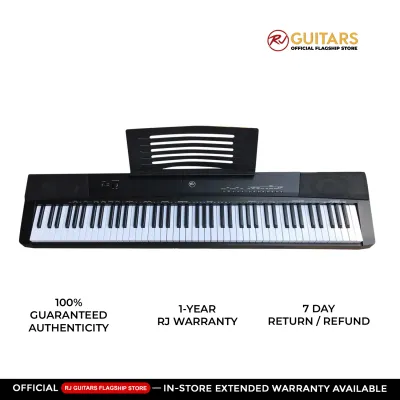
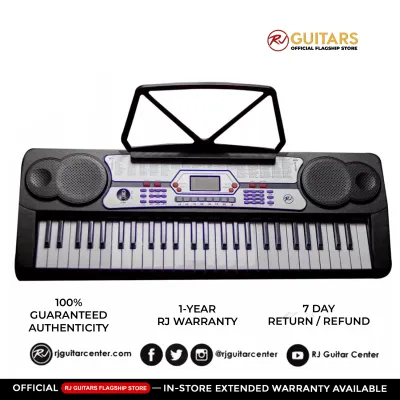
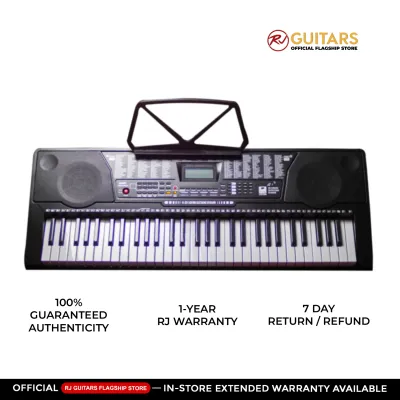
Prices are valid at publication and may change. Please refer to the product page for the latest price.
The “budget” or “entry-level” segment, on the other hand, generally starts around ₱10,000 and can extend up to ₱25,000. This tier is dominated by global manufacturers such as Casio, Yamaha, and Roland. These companies design instruments intended for international distribution, meaning their components, software, and quality control must meet standardized global benchmarks. They also maintain dedicated distribution networks and authorized service centers across the country, ensuring that replacement parts and professional repairs are accessible.
Choosing between these tiers is not merely a question of finding the cheapest price tag. It requires balancing the initial financial outlay against the long-term value of the instrument. An ultra-budget keyboard might save you money today, but if a student outgrows its non-weighted keys within six months, or if a minor hardware failure cannot be repaired due to a lack of spare parts, the initial savings can quickly disappear. Conversely, investing in a more expensive global brand often yields a higher resale value and a longer lifespan, making it a more sustainable choice for dedicated learners.
Core Specifications to Compare Before You Buy
Evaluating a keyboard requires looking past marketing slogans and focusing on concrete technical specifications. Whether you are browsing options in a physical mall or comparing listings on a local ecommerce platform, understanding these core technical details will help you make an informed decision.

Sound Engine, Polyphony, and Audio Output
Polyphony refers to the maximum number of individual notes or voices that a keyboard can produce at the exact same time. When you play a chord while holding down a sustain pedal, each note continues to ring out; if you exceed the keyboard’s polyphony limit, the oldest notes are abruptly cut off to make room for new ones. For absolute beginners playing simple melodies, a low polyphony count of 32 notes may suffice. However, as you progress to classical pieces, complex jazz chords, or layered sounds (such as piano combined with strings), you will quickly require a minimum of 64 or even 128 notes of polyphony to prevent audible dropouts. This is especially true when using auto-accompaniment styles, where the backing band instruments also consume available polyphony channels.
When evaluating a keyboard, always check the official manufacturer specification sheet for the exact polyphony rating rather than relying on promotional descriptions. Be skeptical of vague marketing terms like “ultra-realistic sound,” “HD audio,” or “concert hall resonance.” Instead, look for concrete technical details regarding the sound source, such as the specific sampling technology used. Additionally, check the physical audio output specifications, including the wattage of the built-in speakers (usually expressed as something like 2W + 2W for budget models) and the size of the speaker drivers, as these physical dimensions dictate how full and clear the instrument will sound in your room. A higher wattage output ensures that the sound remains clean and undistorted even when playing at higher volumes during family gatherings.
Key Action and Touch Sensitivity
The physical construction of the keys determines how closely a keyboard mimics the feel of a traditional acoustic piano. Non-weighted keys, often referred to as synth action, offer very little resistance and rely on simple plastic springs; they are easy for young children to press but do not build finger strength. Semi-weighted keys add a small amount of resistance, offering a slight compromise. Fully weighted hammer action keys use mechanical weights to replicate the physical hammers of an acoustic piano, providing the heavy, responsive feel necessary for serious students. Without this weighted action, transitioning from a digital keyboard to an actual acoustic piano in a teacher’s studio can be highly frustrating for a student.
Touch sensitivity, or velocity sensitivity, is a critical electronic feature that detects how hard or soft you strike a key, adjusting the volume and character of the sound accordingly. Without touch sensitivity, every note plays at the exact same volume regardless of your finger pressure, making expressive playing impossible. While global entry-level models almost always feature adjustable touch sensitivity, many ultra-budget keyboards lack this feature entirely or offer a very basic, non-adjustable version. It is highly recommended to visit a local retail store and physically press the keys to evaluate their resistance, bounce, and mechanical noise before making a decision. Pay close attention to how much the keys wobble from side to side, as high-quality key beds maintain strict vertical alignment.
Connectivity and Practical Learning Features
Modern learning often relies on external devices, making the physical ports on the back of the keyboard incredibly important. Look for a USB-to-Host port, which allows the keyboard to send MIDI data to a computer, tablet, or smartphone. This connection is essential if you plan to use interactive learning apps, notation software, or digital audio workstations (DAWs). Ensure the specification sheet states that the USB connection is “class-compliant,” meaning it will work automatically without requiring you to install hard-to-find proprietary drivers. A class-compliant port saves you from compatibility issues when operating systems update.
Other essential physical connections include a standard 1/4-inch or 3.5mm headphone jack for silent practice, which is particularly useful in busy household environments or condominiums. A dedicated sustain pedal input is also vital; some ultra-budget models use proprietary pedal connections or omit the input entirely, which severely limits your ability to play standard piano repertoire. Finally, look for built-in educational tools such as an adjustable metronome for rhythm practice, a basic onboard recording function to listen back to your performances, and split or duo modes that allow a teacher and student to play in the same octave range simultaneously. These features eliminate the need for external accessories and make daily practice sessions much more efficient.
When using interactive learning apps or digital songbooks bundled with your keyboard, always verify the software edition, language options, file format compatibility, and any potential regional restrictions. Do not assume that a keyboard will automatically work with every learning platform; check the manufacturer’s official compatibility list and ensure you are downloading software from authorized, official sources to avoid connectivity or licensing issues.
RJ Keyboards vs. Global Entry-Level Brands: The Trade-Offs
When comparing RJ keyboards directly to global entry-level brands, the most obvious trade-off lies in the feature-to-price ratio. Ultra-budget brands like RJ often pack their instruments with an overwhelming variety of built-in features to maximize appeal. It is common to find models boasting 500 different instrument voices, 300 auto-accompaniment rhythms, and dozens of pre-programmed songs. For a casual user or a family looking for an entertainment device, this variety provides hours of fun and experimentation.
In contrast, a global brand’s entry-level model at a slightly higher price point might offer only 10 to 30 voices and a handful of rhythms. However, the quality of those few sounds is typically much higher. Global brands focus their engineering budgets on creating highly accurate acoustic piano samples, capturing the subtle nuances, decay, and resonance of real grand pianos. The physical key beds are also designed with tighter tolerances, resulting in more consistent key height, less lateral wobble, and a quieter mechanical action over years of daily use.
Another critical factor is long-term after-sales support and durability. In the tropical climate of the Philippines, high humidity and dust can affect electronic contacts and key sensors over time. Global brands maintain established service networks with authorized technicians and readily available spare parts, such as replacement key springs, contact strips, and power boards. With ultra-budget brands, finding specialized replacement parts can be difficult once the store’s initial warranty period expires. Before completing a purchase, always request a copy of the written warranty policy to confirm what components are covered and where the physical service centers are located.
Decision Framework: Which Keyboard Should You Choose?
To help you navigate this decision, consider how your specific budget, learning goals, and household environment align with the following scenarios.
Choose an RJ keyboard if:
- Strict Budget Constraints: You have a hard price limit under ₱8,000 and want a complete starter package without delaying your musical journey.
- Casual or Recreational Play: The primary user is a young child testing their interest, or a casual hobbyist who wants to play familiar melodies and sing along with auto-accompaniment rhythms.
- Value-Packed Entertainment: You prioritize having a wide variety of instrument sounds, drum beats, and built-in novelty effects for casual family gatherings.
Choose an established global entry-level brand if:
- Serious Academic Learning: The player is enrolling in formal piano lessons, studying classical music, or preparing for graded practical exams that require proper finger technique.
- Expressive Performance: You require a highly responsive touch-sensitive key bed that accurately translates subtle variations in finger velocity into dynamic volume changes.
- Modern App Integration: You plan to connect the keyboard to an iPad, Android tablet, or computer to use interactive learning platforms, synthesizer apps, or music production software.
- Long-Term Reliability: You want peace of mind backed by a comprehensive manufacturer warranty and an established network of physical service centers across the Philippines.
Verify these details before finalizing any purchase:
- Return and Exchange Policies: If purchasing from an online marketplace, confirm that the seller offers a clear return window in case the item arrives damaged or defective.
- Package Inclusions: Read the product description carefully to see if essential accessories like a power adapter, music sheet stand, and sustain pedal are included, or if they must be purchased separately.
- Model Revision: Verify the exact model number on the manufacturer's official website to ensure you are not buying an outdated, discontinued stock item that lacks modern connectivity features.
Pre-Purchase Checklist for Local Buyers
Before you hand over your hard-earned pesos, take a moment to run through this practical checklist tailored for the Philippine market:
- Power Adapter Compatibility: Verify that the included power adapter is rated for the standard Philippine voltage (220V at 60Hz). Some imported keyboards require a step-down transformer or a specific plug adapter; using the wrong power supply can permanently fry the internal circuitry.
- Sturdy Stand and Bench: Avoid placing your keyboard on a standard plastic folding table, as these tend to wobble during enthusiastic playing, which can ruin your posture and technique. Budget for a sturdy double-brace X-stand or a dedicated wooden stand, along with an adjustable bench.
- Environmental Protection: The high humidity and dust in the Philippines can cause key sensors to become sticky or unresponsive over time. Invest in a simple fabric or spandex keyboard cover to protect the instrument when it is not in use, and avoid placing it directly under an air conditioning unit or in direct sunlight.
- Physical Inspection: Whenever possible, visit a physical showroom to test the keyboard in person. Press multiple keys simultaneously with the power turned off to listen for any excessive clicking or squeaking, and check the responsiveness of the control panel buttons and LCD screen.
Community discussion
Share your experience or ask a question. Comments are reviewed before publication.