
Choosing between a MIDI keyboard and a regular keyboard depends entirely on how you plan to produce sound. If you want to connect to a computer or mobile device to control software instruments, record digital tracks, and produce music, a MIDI keyboard is your ideal tool. If you prefer to switch on the instrument and play immediately using built-in speakers and pre-loaded sounds without needing any external devices, a regular keyboard is the correct choice.
Understanding your specific workflow, space limitations, and musical goals will prevent you from purchasing the wrong gear. Both instruments serve distinct purposes in a musical setup, and choosing the wrong one can lead to frustration, unexpected extra expenses, or gear that simply sits unused in your home.
Understanding the Core Difference: MIDI Controller vs. Standalone Keyboard
The fundamental difference between these two instruments lies in how they handle sound generation. A MIDI keyboard, often called a MIDI controller, does not actually make any sound on its own. Instead, it acts as an input device, much like a computer keyboard or a mouse. When you press a key, the controller generates Musical Instrument Digital Interface (MIDI) data, which includes information about which note was pressed, how hard it was struck (velocity), and how long it was held. This data is sent via a USB cable to an external device, such as a computer, tablet, or hardware synthesizer, which then translates that data into audible sound.
Products mentioned in this guide
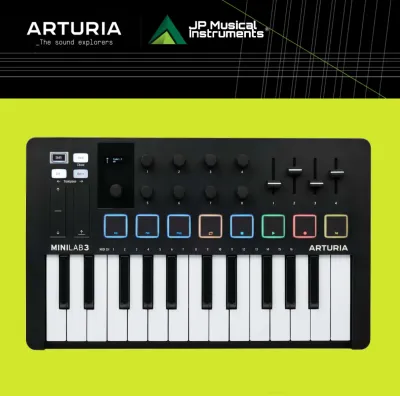
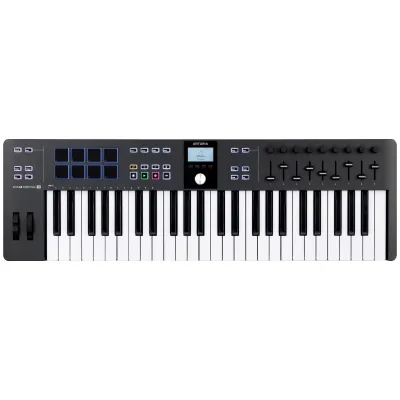

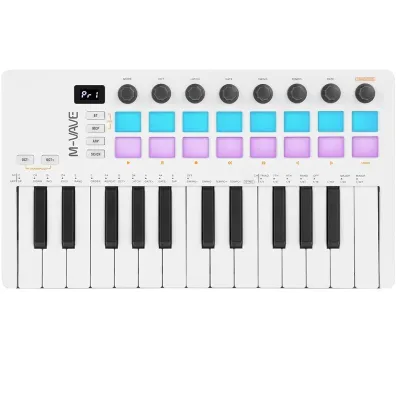


Prices are valid at publication and may change. Please refer to the product page for the latest price.
Conversely, a regular keyboard is a standalone instrument equipped with its own internal sound engine, digital-to-analog converters, and built-in speakers. When you press a key on a regular keyboard, the internal computer chips instantly trigger a pre-recorded or synthesized sound, which is then amplified directly through the physical speakers on the unit. You only need to plug the instrument into a wall outlet to begin playing.
Because a MIDI keyboard relies entirely on external processing, it is useless without a host device. You must connect it to a computer running a Digital Audio Workstation (DAW) or a mobile device loaded with virtual instrument applications. A regular keyboard requires none of this infrastructure, though many modern models do include basic MIDI outputs if you want to use them as controllers later on.
Diagnostic Checklist: Signs You Need a MIDI Keyboard
A MIDI keyboard is designed for modern digital music production and sound design. You should choose a MIDI controller if your workflow aligns with the following scenarios:

- You rely heavily on music software: If you spend your time inside a DAW like Ableton Live, FL Studio, Logic Pro, or Reaper, a MIDI controller is essential. It allows you to play and record hundreds of different virtual instruments (VSTs), from orchestral strings to vintage synthesizers, directly into your software tracks.
- You need hands-on software control: MIDI controllers often feature assignable knobs, faders, and drum pads. These physical controls allow you to map software parameters directly to your hands, letting you adjust volume levels, tweak synthesizer filters, or trigger drum samples in real time without touching your mouse.
- Your space is limited: If you are setting up a home studio in a compact bedroom or a shared living space, desktop real estate is precious. MIDI keyboards are generally much more compact than regular keyboards because they lack bulky internal speakers and extensive analog circuitry. A 25-key or 49-key controller can easily sit directly in front of your computer monitor.
- You already own the necessary audio gear: If you already have a capable computer, a pair of studio monitors, or high-quality studio headphones, you are already halfway to a complete MIDI setup. The controller simply plugs in and utilizes the processing power you already own.
Diagnostic Checklist: Signs You Need a Regular Keyboard
A regular keyboard is built for performance, practice, and immediate musical gratification. A standalone keyboard is the right choice if you identify with these preferences:
- You want instant plug-and-play operation: If you want to sit down and play music within seconds of turning on the power, a regular keyboard is unmatched. There are no computers to boot up, no software updates to install, and no audio latency issues to troubleshoot.
- Your focus is traditional piano practice: If you are taking piano lessons, practicing classical pieces, or learning music theory, you need an instrument that behaves like a piano. Regular keyboards, especially digital pianos, are designed to replicate the feel and response of acoustic keys, often featuring weighted actions and high-quality grand piano samples.
- You need built-in speakers: If you plan to play in different rooms of your home, teach students, or perform at small family gatherings, built-in speakers are incredibly convenient. You do not need to carry external amplifiers, audio interfaces, or a tangle of connection cables.
- You prefer hardware-based sound manipulation: Many regular keyboards, particularly arranger keyboards, come with built-in accompaniment styles, rhythm tracks, and onboard effects. This allows you to play along with a virtual band directly from the keyboard's interface without needing to program a computer.
Key Decision Factors to Compare Before Buying
Before making your final purchase, you must evaluate several practical dimensions to ensure the instrument fits your physical space, budget, and playing style.
Key Action and Feel
The physical feel of the keys significantly impacts your playing experience. Synth-action keys are light, springy, and ideal for fast synthesizer leads or recording drum parts. Semi-weighted keys offer a bit more resistance, making them a versatile middle ground. Fully weighted keys mimic the heavy hammer action of an acoustic piano, which is crucial for developing proper finger strength and dynamics. While regular digital pianos almost always feature weighted keys, MIDI controllers offer a wider variety of actions across different price points.
Connectivity Requirements
Consider how the instrument will connect to the rest of your gear. A MIDI keyboard typically requires a single USB-to-host cable to draw power and transmit data. If you plan to connect to older hardware synthesizers, look for a controller with traditional 5-pin MIDI ports. Regular keyboards require a dedicated power adapter and feature 1/4-inch audio outputs for connecting to external amplifiers or PA systems, along with headphone jacks for silent practice.
Total Cost of Ownership
When budgeting, look beyond the price tag of the keyboard itself. A basic MIDI controller might cost around ₱3,500 to ₱8,000, but you must factor in the cost of a computer, a DAW, virtual instruments, and potentially an audio interface. A regular keyboard might have a higher initial cost—ranging from ₱10,000 for a decent entry-level model to ₱35,000 or more for a weighted digital piano—but it is a self-contained system with no hidden software costs.
| Feature | MIDI Keyboard (Controller) | Regular Keyboard (Standalone) |
|---|---|---|
| Sound Generation | Requires external software/hardware | Built-in sound engine |
| Built-in Speakers | None (requires computer/headphones) | Yes (usually built-in) |
| Primary Connection | USB to computer/tablet | Power outlet, audio out, headphones |
| Portability | Highly portable, lightweight | Varies (from light to heavy digital pianos) |
| Best For | Music production, beat-making, sound design | Piano practice, live performance, casual play |
| Setup Complexity | High (requires software configuration) | Low (plug and play) |
Frequently Asked Questions (FAQ)
Can I use a MIDI keyboard as a regular keyboard?
No, you cannot use a MIDI keyboard as a standalone regular keyboard because it has no internal sound engine or speakers. If you turn it on without connecting it to an external device, pressing the keys will produce absolute silence. However, you can make a MIDI keyboard function similarly to a regular keyboard by connecting it to a smartphone or tablet using a compatible USB adapter and running a free virtual instrument app. While this setup works, it still requires external cables and a mobile device to function.
Which type of keyboard is better for a complete beginner?
The best choice for a beginner depends entirely on what you want to learn. If your primary goal is to learn traditional piano technique, read sheet music, and play classical or pop songs, a regular keyboard with touch-sensitive or weighted keys is highly recommended. If your goal is to produce electronic music, create beats, or learn modern sound design, a MIDI keyboard paired with a computer is the more practical and cost-effective entry point.
Do I need an audio interface for a MIDI keyboard?
You do not need an audio interface simply to transmit MIDI data, as this travels directly from your keyboard to your computer via a standard USB cable. However, you may want an audio interface to improve the sound quality of your virtual instruments, reduce audio latency (the delay between pressing a key and hearing the sound), and allow you to connect professional studio monitors or headphones to your computer setup.
Community discussion
Share your experience or ask a question. Comments are reviewed before publication.