
Quick Answer: Which M-Audio Series Should You Choose?
Choosing a MIDI controller from M-Audio depends on your primary workflow, playing style, and physical workspace. The brand offers three distinct product lines designed for different types of musicians.
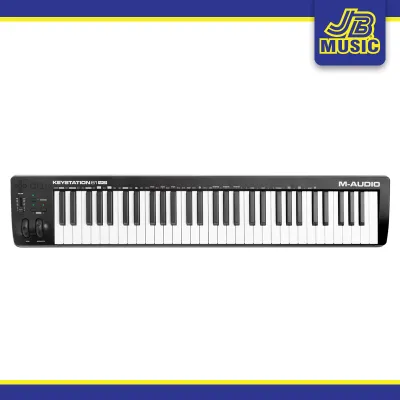
The Keystation series is minimalist, lightweight, and budget-friendly. It focuses on pure keyboard input with synth-action or semi-weighted keys, making it ideal for basic MIDI entry, virtual instrument tracking, and mobile setups.
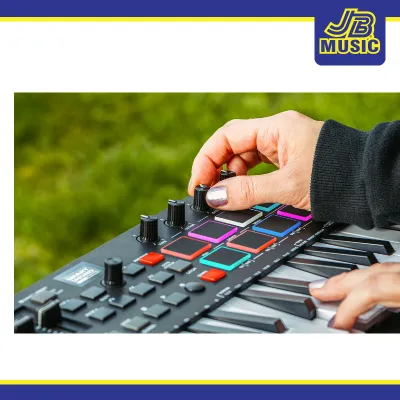
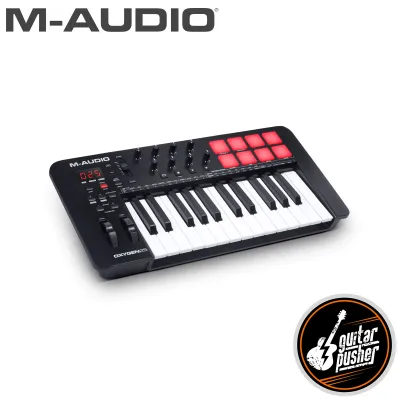
The Oxygen series is feature-rich and production-oriented. Equipped with drum pads, faders, knobs, and dedicated transport controls, it is best for beatmakers, electronic music producers, and home studio engineers who want hands-on DAW control.
Products mentioned in this guide
Prices are valid at publication and may change. Please refer to the product page for the latest price.
The Hammer series is performance-focused and piano-realistic. It features fully weighted, hammer-action keys that mimic the resistance of an acoustic piano, designed for classical pianists, keyboard students, and film composers who prioritize expressive touch.
To decide, choose Keystation if you want a straightforward, space-saving keyboard for entering notes. Choose Oxygen if you want to mix tracks, trigger samples, and tweak synth parameters directly from your controller. Choose Hammer if you need to practice piano techniques or record highly dynamic piano arrangements.
Key Action and Playability: Synth-Action vs Semi-Weighted vs Hammer
The physical feel of the keys is a critical factor when selecting a MIDI controller, as it directly impacts your playing comfort and musical expression. M-Audio utilizes three distinct keybed technologies across these series to accommodate different playing styles.

Synth-action keys, which are standard on most Keystation models, are light, springy, and offer minimal resistance. This design allows for rapid note repetition, making it highly suitable for playing fast synthesizer leads, brass lines, and organ parts. Because these keys lack heavy internal weights, synth-action controllers are exceptionally lightweight and easy to transport.
Semi-weighted keys, often found in larger Keystation models and select Oxygen variations, introduce a slight mechanical resistance using small weights or stiffer springs. This hybrid feel provides a middle ground, offering enough tension for expressive virtual instrument playing without the heavy physical demand of a real piano. Some advanced models in the Oxygen line also feature aftertouch, a sensor technology that detects how hard you press a key after it is already held down, allowing you to modulate effects or filter sweeps in real time.
Hammer-action keys, exclusive to the Hammer series, employ a graded mechanical hammer system designed to replicate the physical leverage of an acoustic piano. The keys feel heavier in the lower register and lighter in the treble, helping pianists maintain proper finger strength and dynamic control. This action is essential for performing classical pieces or recording nuanced virtual piano libraries where subtle variations in velocity are critical.
When shopping, it is important to verify the exact keybed specifications on the manufacturer’s official website, as key counts (ranging from 25, 32, 49, 61, to 88 keys) and action types can vary significantly between specific model generations.
Built-in Features and Workflow Controls
Beyond the feel of the keys, the onboard control layout determines how you interact with your digital audio workstation (DAW) and virtual instruments. The three series represent very different philosophies regarding hands-on control.
The Keystation series adopts a minimalist approach, offering only the essential controls needed for basic performance. You will typically find a pitch bend wheel, a modulation wheel, octave transpose buttons, and a single volume slider. This clean layout keeps the footprint small and prevents distractions, making it perfect for musicians who prefer to handle mixing and editing using a computer mouse and keyboard.
In contrast, the Oxygen series is designed as an all-in-one production hub. It features an array of velocity-sensitive drum pads for programming beats, assignable knobs for adjusting plugin parameters, and physical faders for mixing track volumes. Many Oxygen models also include smart chord and smart scale modes, which prevent you from playing out-of-key notes, alongside built-in arpeggiators for creating rhythmic patterns.
The Hammer series prioritizes piano-centric performance over extensive DAW mixing controls. Instead of rows of faders and drum pads, these keyboards focus on essential performance features such as dedicated inputs for sustain, soft, and expression pedals. Some models may include basic volume sliders or zone-splitting buttons to layer multiple virtual instruments, but they generally avoid the dense control surfaces found on production-focused controllers.
Before making a purchase, always check the official product documentation to verify the included software bundles, DAW mapping templates, and hardware input configurations to ensure seamless integration with your specific setup.
Matching the Series to Your Musical Goals
Selecting the right keyboard requires aligning its features with your daily creative tasks, whether you are composing orchestral scores or producing electronic beats in a home studio.
For beginners, hobbyists, and mobile musicians, the Keystation series offers a practical and cost-effective entry point. Its simple plug-and-play design allows you to start recording immediately without navigating complex configuration menus. The smaller 32-key and 49-key models are particularly well-suited for tight desk spaces, backpack travel, or quick MIDI sequencing on the go.
For electronic music producers, beatmakers, and sound designers, the Oxygen series provides the tactile feedback necessary for modern music production. The physical drum pads are excellent for tapping out drum patterns, while the assignable knobs allow you to sweep synthesizer filters and adjust effects dynamically during a performance or recording session.
For classical pianists, music students, and film composers, the Hammer series is the most appropriate choice. It allows you to practice authentic piano techniques, build finger stamina, and perform complex classical repertoire with realistic dynamic response. The weighted keys ensure that your expressive nuances are accurately captured by your virtual piano instruments.
Final Decision Framework: Choose Based on Your Setup
To finalize your decision, you must evaluate your physical environment, technical requirements, and local purchasing conditions.
Physical space is a primary constraint when choosing a keyboard controller. A compact 25-key or 49-key Keystation or Oxygen model can easily sit on a standard computer desk alongside your monitor and mouse. However, an 88-key Hammer series keyboard requires a dedicated, sturdy keyboard stand and sufficient floor space, making it a permanent fixture in your room.
Connectivity and power requirements also vary across these lines. While most Keystation and Oxygen models run entirely on USB bus power from your computer, larger weighted keyboards like the Hammer series may require an external power supply to operate reliably. Additionally, ensure your chosen model has the correct pedal inputs, especially if you plan to use a multi-pedal unit for realistic piano dampening.
Environmental factors in tropical climates like the Philippines should also influence your maintenance routine. High humidity can affect the longevity of rubber contact pads and keybed lubricants over time. It is highly recommended to use a fitted dust cover when your keyboard is not in use and to store your equipment in a well-ventilated or air-conditioned room to prevent moisture buildup.
Finally, always verify current local availability, warranty terms, and exact model generations (such as MK3 or Mini editions) through authorized music retailers in the Philippines. Purchasing from official local distributors ensures you receive genuine products, reliable customer support, and valid warranty coverage for your investment.
Frequently Asked Questions (FAQ)
Do I need a separate audio interface to use these M-Audio keyboards?
No, you do not necessarily need a separate audio interface to use these keyboards, as they are MIDI controllers rather than standalone synthesizers. They do not generate sound on their own; instead, they send digital MIDI data to your computer or tablet via a USB cable, which triggers sounds inside your DAW or virtual instrument software.
However, an audio interface becomes highly beneficial if you experience audio latency (delay between pressing a key and hearing the sound) or if you want to connect high-quality studio monitors and headphones. An interface is also required if you plan to record external microphones or electric guitars alongside your MIDI keyboard performances.
Can I use the Hammer series as a master keyboard for my DAW?
Yes, the Hammer series can function as a master keyboard for your DAW, especially if your production style relies heavily on expressive piano playing and orchestral composition. Most Hammer models include basic transport controls (such as play, stop, and record) and assignable buttons that allow you to navigate your software project without constantly reaching for your mouse.
That said, if your workflow requires extensive mixing, real-time automation recording, or drum pad performance, the Hammer series may feel limiting. In those scenarios, you might consider pairing a Hammer keyboard with a compact, pad-focused controller, or choosing an Oxygen series keyboard instead for its dedicated mixing faders and rotary knobs.
Community discussion
Share your experience or ask a question. Comments are reviewed before publication.