
Buying an official MAMAMOO lightstick—affectionately known as the Moobong—online requires careful vigilance to avoid falling victim to counterfeit listings. With the rise of online marketplaces, replica concert goods have become increasingly sophisticated, making it easy to accidentally purchase a fake. To ensure your lightstick is genuine, you must evaluate the seller’s listing, inspect the physical packaging and build quality upon arrival, and test its Bluetooth connectivity with the official app. Taking these precautions protects your hard-earned money and guarantees your lightstick will sync perfectly during concerts.
Red Flags in Online Product Listings
When browsing online marketplaces in the Philippines, the first line of defense is analyzing the product listing itself. Price is often the most immediate indicator of authenticity. Official K-pop lightsticks generally retail within a specific price range, typically between ₱2,500 and ₱3,500 depending on the version and shipping costs from South Korea. If you encounter a listing offering a brand-new Moobong for ₱1,000 or less, treat it with extreme suspicion, as genuine manufacturing and import costs make such low prices highly unrealistic.
Next, examine the product description and images provided by the seller. Authentic listings usually specify the exact version of the lightstick and detail the contents of the box, including the strap, user manual, and outbox. Be wary of listings that rely solely on low-resolution stock photos or official promotional images instead of actual photos of the physical stock. Vague descriptions, poor machine translations, or a lack of technical specifications often point to a drop-shipping operation selling replica goods.
Products mentioned in this guide
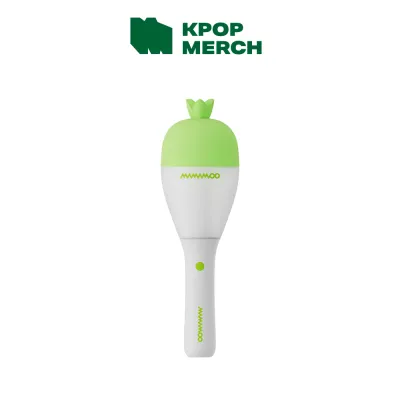
Prices are valid at publication and may change. Please refer to the product page for the latest price.
Seller metrics and customer feedback offer invaluable clues about a shop’s reliability. Check the seller’s overall rating and read through the reviews, paying close attention to the low ratings where buyers often report receiving counterfeits. Look for detailed buyer reviews that include photos and videos of the received product. If a listing has hundreds of sales but zero photo reviews, or if the reviews seem generic and repetitive, the seller may be inflating their ratings artificially.
Physical and Packaging Verification Standards
Once your package arrives, a thorough physical inspection is crucial before you confirm the receipt of the item on your shopping app. Start by examining the outer packaging, as official manufacturers maintain high standards for box quality. Genuine Moobong boxes feature crisp, high-resolution printing, vibrant colors, and sturdy cardboard that resists collapsing. Counterfeit boxes often use thinner, flimsy cardboard that easily dents during transit, and the printed text or logos may appear slightly blurry, off-center, or faded.

The physical build of the lightstick itself reveals a lot about its origin. Official MAMAMOO lightsticks are made from high-grade, durable plastic with smooth, clean molding seams. Hold the lightstick and feel its weight; replicas often feel noticeably lighter and more fragile due to cheaper internal components and thinner plastic. Pay close attention to the battery compartment in the handle. The spring contacts should be firmly aligned, and the screw-on cap should glide smoothly without catching or stripping the plastic threads.
Additionally, look for official authenticity markers on the packaging. Genuine K-pop merchandise typically includes a holographic sticker or an official authenticity seal from the entertainment agency or the authorized distributor. These holographic stickers should reflect light in a distinct, multi-colored pattern when tilted. Many counterfeiters attempt to replicate these stickers, but their versions often lack the sharp detail, correct serial numbering, or genuine holographic depth found on official seals.
App Connectivity and Functional Testing
The ultimate test of a genuine MAMAMOO lightstick lies in its electronic functionality and software integration. Official Moobongs are equipped with specific Bluetooth chips designed to pair with the official companion mobile application. Before inserting batteries, ensure you are using fresh, high-quality AAA batteries, as weak power can cause pairing failures even on genuine devices. Turn on the lightstick and open the official app on your smartphone to initiate the pairing process.
A genuine lightstick should connect seamlessly to the app, allowing you to control the color-changing modes, adjust the brightness, and register your ticket for concert syncing. The app should also recognize the specific firmware version of your device and prompt you for updates if any are available. Counterfeit lightsticks, which rely on cheap, generic microcontrollers, will almost always fail to register with the official app, even if they manage to show up on your phone’s basic Bluetooth settings.
Observe the lightstick’s physical behavior during testing. Genuine Moobongs display smooth color transitions and consistent brightness across the entire bulb area. If the light flickers, displays incorrect colors, or fails to respond to the app’s central control features, these are clear signs of counterfeit internal hardware. Furthermore, if the companion app crashes repeatedly or displays an ‘unrecognized device’ error when attempting to connect, you are likely holding a replica.
Safe Purchasing Channels and Buyer Protection
To minimize the risk of buying a counterfeit, always prioritize secure purchasing channels and verified sellers. When shopping on major ecommerce platforms, look for listings within the platform’s official mall section or shops marked with verified seller badges. These sellers are vetted by the platform and are legally bound to sell authentic goods. Many established local K-pop hobby shops also maintain online storefronts on these platforms, offering a safer alternative to unverified individual sellers.
Familiarize yourself with the buyer protection policies of the platform you are using. Most reputable shopping apps offer a specific return window during which you can dispute a purchase if the item is proven to be counterfeit. Do not click the button to confirm receipt or release payment to the seller until you have fully inspected and tested the lightstick. Once you confirm that the order is complete, resolving disputes and securing a refund becomes significantly more difficult.
Avoid purchasing concert goods through unverified third-party sellers on social media marketplaces or classified ads, especially those who insist on transactions outside the official platform’s checkout system. Bypassing the platform’s payment gateway strips you of all buyer protection, leaving you with no recourse if the seller sends a fake or disappears with your money. Always insist on using secure, trackable payment methods with built-in dispute resolution.
Steps to Take If You Receive a Counterfeit
If your inspection and testing reveal that the lightstick is indeed a counterfeit, you must act quickly to secure a refund. Start by documenting the evidence thoroughly. Take clear, high-resolution photos of the packaging, the lightstick’s physical defects, the battery compartment, and any blurry printing. If possible, record a continuous video showing the lightstick failing to connect to the official app, as this serves as undeniable proof of a non-functional counterfeit chip.
Next, open a formal return or refund dispute through your ecommerce platform’s official channel. Upload your photo and video evidence, clearly explaining that the item received is a counterfeit product that fails to connect to the official application. Avoid communicating with the seller outside the platform’s chat system, and do not agree to private refund arrangements, as these are often tactics used by fraudulent sellers to delay the process until your protection window expires.
Finally, report the fraudulent listing and the seller’s shop to the platform’s customer support team. Most online marketplaces have strict policies against the sale of counterfeit goods and will take down listings or suspend shops that violate these rules. By reporting the seller, you help protect other K-pop fans in the Philippines from falling victim to the same scam, keeping the local collecting community safe and authentic.
Frequently Asked Questions (FAQ)
Can a fake MAMAMOO lightstick still connect to Bluetooth?
While some high-grade counterfeit lightsticks may feature basic Bluetooth hardware that allows them to pair with a smartphone’s general Bluetooth menu, they almost always fail to connect to the official MAMAMOO companion app. The official app requires a specific, secure handshake with the genuine manufacturer’s chip to enable central control and firmware updates. If the device cannot be recognized or controlled by the official app, it lacks the authentic internal components required for concert syncing.
Are second-hand lightsticks safe to buy online?
Buying second-hand lightsticks carries inherent risks, as you often cannot verify their authenticity or functional state before making a payment. If you choose to buy a pre-owned Moobong, ask the seller for a live video showing the lightstick connecting to the official app, along with detailed photos of the battery compartment to check for corrosion. Ensure the transaction is conducted through a platform that offers buyer protection, and avoid direct bank transfers or un-tracked shipping methods.
Community discussion
Share your experience or ask a question. Comments are reviewed before publication.