
The ideal home karaoke systems with song books for Philippine households are those that balance robust local song libraries with reliable hardware, clear audio output, and flexible update options. Whether you choose a traditional hard-drive console with a physical printed directory or a modern digital system with an on-screen catalog, the key is verifying regional compatibility, voltage requirements, and local service support. Selecting the right setup ensures your family gatherings and celebrations are powered by a dependable system that everyone, from children to grandparents, can easily operate.
Understanding "Song Books" vs. Digital Song Catalogs
The term “song book” has evolved significantly from the thick, laminated binders found in traditional neighborhood rental setups. Historically, a physical song book lists thousands of tracks alphabetically by title or artist, each paired with a unique five-digit or six-digit code. Users input these codes into a physical remote control or a dedicated keypad connected to the player. While highly nostalgic and straightforward for multi-generational households, physical books require manual page-flipping and can quickly become outdated as new music is released. Passing a physical book around the room also remains a highly social aspect of local gatherings, allowing guests to browse tracks together.
In contrast, digital song catalogs display the entire library directly on a television screen, tablet, or smartphone. These systems allow users to search by typing keywords, filtering by genre, or browsing curated playlists. Digital catalogs eliminate the need for physical storage and make it easier to find songs quickly. Many modern systems also feature QR code integration, allowing guests to scan a code on the television screen and browse the entire song directory on their mobile phones without interrupting the person currently singing.
Products mentioned in this guide

Prices are valid at publication and may change. Please refer to the product page for the latest price.
The structure of these libraries varies based on the system’s architecture. Hard-drive-based systems store song files locally, meaning the directory is fixed until a manual update is performed. Cloud-based systems pull tracks from remote servers, offering a dynamic and constantly expanding library. When evaluating either option, it is essential to verify how the system handles regional language support. In the Philippines, a robust catalog must feature a wide selection of local music, including classic Original Pilipino Music tracks, regional folk songs, and contemporary local pop, alongside international hits.
Core Evaluation Criteria for Home Karaoke Systems
Selecting the right home karaoke system requires a careful assessment of audio performance and hardware compatibility. The system’s audio output must match the acoustics of your typical living space. For standard living rooms, a system that supports dual wireless or wired microphones with independent volume and echo controls is ideal. High-quality microphone preamps prevent distortion during high-energy vocal performances, ensuring that both high notes and deep bass tones are reproduced clearly without clipping. If you live in a dense residential area, opting for Ultra High Frequency wireless microphones is recommended, as they are less prone to signal interference than Very High Frequency models.

Connectivity is another vital factor when managing your song catalog. Modern systems should feature HDMI outputs to transmit high-definition video and digital audio to your television with minimal latency. Bluetooth connectivity allows you to pair mobile devices, enabling you to use your phone or tablet as a secondary screen for browsing the song directory. Additionally, USB ports are crucial for systems that allow manual song updates or local media playback, giving you the flexibility to expand your library independently. To avoid audio latency—the frustrating delay between singing into the microphone and hearing your voice through the speakers—look for systems that offer analog audio outputs, such as RCA or dedicated optical connections, to bypass slow television audio processing.
Storage capacity directly impacts the size and quality of your offline song directory. Systems utilizing local storage typically rely on internal hard drives or high-capacity SD cards. Larger storage capacities allow for high-definition video backgrounds and uncompressed audio formats, which deliver clearer sound quality compared to highly compressed MIDI files. Before purchasing, check the manufacturer’s specifications regarding supported file formats to ensure compatibility with any existing digital music collections you plan to integrate.
Types of Karaoke Systems With Built-in Directories
Home karaoke systems generally fall into three distinct categories, each offering a unique approach to catalog management. All-in-one portable systems are highly popular for their compact design and ease of transport. These units often feature integrated speakers, rechargeable batteries, and wireless microphones, making them suitable for outdoor gatherings or moving between rooms. The song directory in these systems is typically pre-loaded onto a micro-SD card or internal flash memory, allowing for completely offline operation, though the total song count may be more limited compared to larger console units.
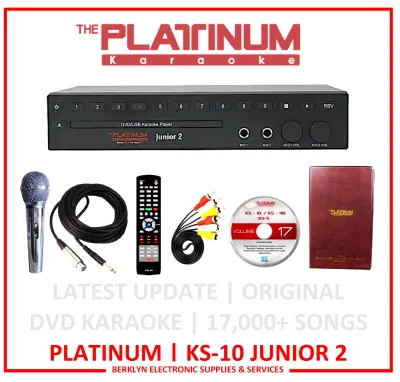
Traditional console or hard-drive players represent the classic home setup. These heavy-duty units are designed to remain stationary, connected directly to your home theater receiver and television. They rely on massive internal hard drives containing tens of thousands of pre-loaded songs, accompanied by a physical printed song book and a full-sized remote control. While these systems require more physical space and a higher initial setup effort, they offer high reliability, zero internet dependency, and professional-grade audio processing components. Solid-state drives are generally more durable than traditional mechanical hard drives, especially if the console is moved frequently.
Smart media players and app-based hubs represent the modern, cloud-connected approach to home karaoke. These compact devices connect to your home Wi-Fi network to stream songs directly from online databases or dedicated subscription services. While they offer virtually unlimited song libraries that update automatically with the latest global hits, they are highly dependent on a stable internet connection. If your home network experiences frequent drops or bandwidth limitations, a cloud-based system may suffer from buffering, low-resolution video, or temporary access loss, making a hybrid system with local backup storage a safer choice for uninterrupted entertainment.
Pre-Purchase Checklist and Compatibility Checks
Before finalizing your purchase, it is essential to run through a comprehensive checklist to ensure the system meets your household’s specific needs. First, verify the composition of the song catalog. Ensure the pre-loaded library contains a balanced mix of genres, including the specific local artists and regional languages preferred by your family. Some systems specialize in international pop but offer limited local selections, while others are tailored specifically for the local market with extensive regional catalogs. Additionally, check if the song library is officially licensed, as unauthorized systems often feature poorly sequenced MIDI tracks with inaccurate lyrics and timing.
Physical and electrical compatibility must also be verified. In the Philippines, the standard electrical supply is 220V at 60Hz. Ensure the karaoke player and its accompanying power adapters are rated for this voltage to prevent electrical damage or fire hazards. Additionally, measure the physical space where you plan to install the system, keeping in mind the ventilation requirements for hard-drive consoles, which can generate heat during extended use. Using a dedicated voltage regulator or an uninterruptible power supply is highly recommended to protect your equipment from sudden power surges or brownouts.
Finally, investigate the manufacturer’s local support network. Confirm the warranty terms, return policies, and the location of authorized service centers within the country. Purchasing from reputable distributors ensures that you can easily source replacement parts, such as replacement microphones, power cords, or updated song chips, and access professional repair services if the hardware encounters issues down the line. When budgeting for a high-capacity system, which may range from ₱5,000 to over ₱20,000 depending on the storage size and microphone quality, local warranty support provides essential peace of mind.
Setup, Care, and Troubleshooting Basics
Setting up your home karaoke system correctly is vital for achieving clear sound quality and preventing equipment wear. Begin by routing the video output directly to your television, while routing the audio output to your dedicated speakers or soundbar. Avoid routing audio through the television speakers, as they are rarely designed to handle the dynamic peaks of live vocals, which can lead to distorted sound or speaker damage. Ensure all cable connections are secure and free of tension.
Proper maintenance extends the lifespan of your equipment, especially in tropical climates where high humidity can affect electronic components. Store physical song books in a cool, dry place away from direct sunlight to prevent pages from warping or sticking together. For microphones, use foam windscreens to protect the capsules from moisture, and always remove the batteries from wireless transmitters when the system is not in use for an extended period to prevent battery leakage and corrosion. Regularly wiping down the console and microphones with a dry microfiber cloth helps prevent dust buildup in the ports.
When troubleshooting common issues, a systematic approach is highly effective. If you encounter catalog loading errors, check the storage media connection, ensuring the SD card or external hard drive is fully seated in its slot. If you experience audio feedback—that high-pitched squealing sound—immediately lower the microphone volume, ensure the microphones are positioned behind the main speakers, and avoid pointing the microphone grille directly at the audio outputs. For wireless connectivity drops, minimize physical obstructions between the receiver and the microphones, and keep other wireless devices like Wi-Fi routers at a safe distance to reduce signal interference.
Frequently Asked Questions (FAQ)
Can I update the songs in a physical song book system?
Traditional hard-drive systems that use physical song books cannot have their printed directories dynamically updated. However, the internal digital library can often be expanded. Depending on the manufacturer, you can purchase song update volume chips, download official update files onto a USB flash drive, or visit an authorized service center to load new tracks. Once the digital library is updated, you can print out supplementary song sheets or use an official mobile app companion to view the newly added codes.
Do karaoke systems with song books require an internet connection?
No, traditional karaoke systems with physical song books and local hard drives or SD cards do not require an internet connection to function. All song files, video backgrounds, and audio tracks are stored locally on the device, making them ideal for areas with unstable internet coverage. Conversely, modern smart media players and app-based hubs that rely on cloud streaming do require a continuous, stable internet connection to access their song catalogs.
How do I prevent audio feedback when using karaoke microphones at home?
To prevent audio feedback, always position your speakers forward of your singing area, ensuring the microphones remain behind the speaker cones. Avoid pointing the microphone directly at the speakers, and maintain a reasonable distance between the singer and the sound output. Additionally, adjust the microphone gain and echo levels gradually; excessive treble or echo settings are common triggers for feedback loops in smaller, enclosed living spaces.

Community discussion
Share your experience or ask a question. Comments are reviewed before publication.