
Selecting the ideal home karaoke system with a songbook is a decision that directly shapes the atmosphere of your family gatherings, weekend celebrations, and holiday reunions. In the Philippines, singing is a deeply rooted tradition that brings generations together, making a karaoke machine one of the most valued investments for the home. To find a system that keeps everyone entertained—from grandparents who love classic ballads to younger children eager to sing the latest pop hits—you must look beyond basic volume controls. The right setup balances a comprehensive, localized song catalog with an intuitive navigation format that matches your family’s technical comfort level.
Achieving the perfect home singing experience requires evaluating how songs are stored, searched, and updated. While modern technology offers cloud-based streaming and mobile applications, traditional physical songbooks and dedicated hardware players remain highly popular for their reliability and ease of use. By understanding the practical differences between these formats, assessing key hardware features, and knowing how to verify local music availability, you can choose a system that delivers years of clear, hassle-free entertainment for your household.
Understanding Songbook and Catalog Formats
To choose the right system, you must first decide how your family will browse and select songs. The format of the song directory determines who can easily use the system and how smoothly your singing sessions will run.
Products mentioned in this guide
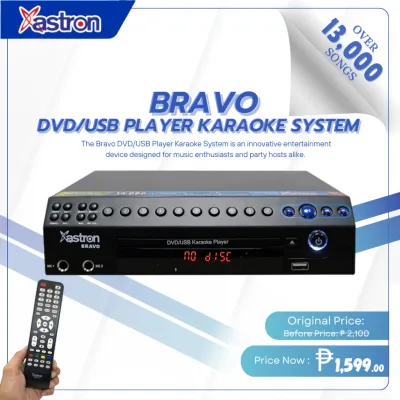
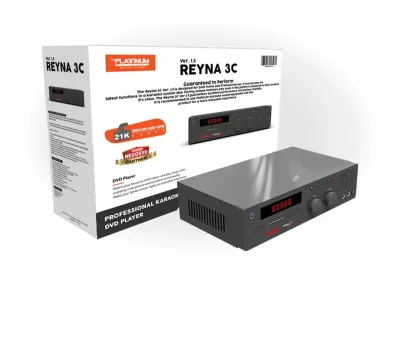

Prices are valid at publication and may change. Please refer to the product page for the latest price.
Physical Printed Songbooks
The traditional printed songbook is a familiar sight in many households. This format consists of a thick, multi-ring binder containing laminated pages organized alphabetically by artist and song title. Next to each entry is a unique four-to-six-digit code that users type into a remote control or the machine’s front panel to queue their selection.
The primary advantage of a physical songbook is its accessibility for all generations. Older family members who may find digital menus confusing can easily flip through the pages, and multiple people can browse the book together while someone else is singing. However, physical books are susceptible to wear, tear, and moisture in humid tropical climates. Additionally, when you add new songs to the system, you must print out supplemental pages to keep the physical directory up to date.
Digital On-Screen Catalogs
Digital on-screen directories replace the paper binder with an interactive menu displayed directly on your television screen. Users navigate this interface using a remote control, a dedicated keyboard, or a control panel on the machine itself. These systems allow you to search for songs by typing in the artist’s name, song title, or even the first letters of each word in the title.
This format eliminates physical clutter and ensures your song list is always perfectly synchronized with the files stored on the machine. The main drawback is that searching for a song can temporarily interrupt the visual flow of the lyrics for the person currently singing, as the search menu often overlays a portion of the screen. Navigating digital menus with a standard remote control can also be slow and frustrating for seniors or young children who prefer a more tactile browsing experience.
App-Based and Cloud Libraries
Modern karaoke systems often leverage wireless connectivity to turn smartphones and tablets into personal songbooks. By downloading a dedicated companion app, family members can connect to the main karaoke unit via Wi-Fi or Bluetooth. This allows everyone in the room to browse the entire catalog, search for tracks, and queue songs directly from their own mobile devices without interrupting the television screen.
While app-based catalogs offer incredible convenience and dynamic search capabilities, they require a stable home network and a basic level of digital literacy. If your household frequently hosts guests of varying ages, relying solely on a mobile app might alienate those who do not have compatible devices or who prefer a simpler, plug-and-play setup.
Verifying OPM and Regional Dialect Availability
For Filipino families, a karaoke system is only as good as its selection of Original Pilipino Music (OPM) and regional songs. Standard international songbooks often lack the classic ballads, novelty tracks, and contemporary local hits that define a true family singing session.
When evaluating different formats, verify how the manufacturer curates and updates its local library. Some dedicated hardware systems use specialized expansion chips or high-capacity SD cards packed with thousands of OPM classics and regional tracks in dialects such as Cebuano, Ilocano, or Hiligaynon. App-based systems, on the other hand, may rely on streaming servers that require an active internet connection to access local content. Always check the song list structure before purchasing to ensure your family’s favorite local artists are well-represented.
Key Features to Evaluate for Family Use
Once you have decided on a songbook format, you must evaluate the hardware and software features of the karaoke system to ensure it can withstand frequent use and deliver clear sound in your living space.

Microphone Quality and Vocal Enhancements
The microphone is the direct link between the singer and the audience. Wireless microphones offer excellent freedom of movement, allowing singers to perform without worrying about tangled cords. However, they require regular battery replacements or recharging, and they can occasionally suffer from signal interference in dense residential areas. Wired microphones remain a highly reliable, low-maintenance alternative that guarantees zero latency and consistent signal quality.
Look for systems that offer independent volume controls for each microphone input. This allows you to balance the sound when two people with different vocal strengths sing a duet. Essential vocal enhancement features include adjustable echo or reverb—which adds depth and warmth to the vocals—and built-in feedback suppression. Feedback suppression is particularly important in home environments, as it prevents the loud, piercing squeals that occur when a microphone gets too close to a speaker.
Screen Readability and User Interface
Because family members of all ages will be reading lyrics from various distances, the clarity of the on-screen display is critical. The system should output high-contrast text with adjustable font sizes and clear progress indicators (such as color-changing text) to help singers stay on beat.
The user interface should be clean and uncomplicated. Avoid systems with cluttered menus, obscure icons, or complex sub-folders. A straightforward home screen with clear categories—such as “Search by Artist,” “Search by Song,” “New Songs,” and “Favorites”—ensures that even occasional users can operate the system without needing constant technical assistance.
Audio Output and Room Compatibility
Your karaoke system’s audio configuration must match the physical characteristics of your living room. Many homes feature open-plan layouts, tiled floors, or concrete walls that reflect sound, which can cause vocals to sound muddy or echo excessively.
To counter this, look for a system that delivers balanced mid-range frequencies, as this is where the human voice resides. High-wattage systems are not always better; instead, focus on clear audio separation between the backing track and the vocals. If you have a smaller living space, a compact system with integrated speakers may be sufficient. For larger living areas, choose a system that can easily connect to your existing home theater amplifier or active stereo speakers to distribute the sound evenly without distortion.
Types of Home Karaoke Setups with Song Directories
Understanding the different types of hardware setups available will help you match a system to your home layout, usage habits, and storage preferences.
Dedicated All-in-One Karaoke Players
These are specialized electronic units designed solely for karaoke. They typically feature a built-in hard drive, DVD drive, or SD card slot where thousands of songs are permanently stored. They connect directly to your television via HDMI for video and to your sound system or TV speakers for audio. These systems almost always come bundled with a physical printed songbook and a dedicated remote control.
All-in-one players are highly valued for their stability and plug-and-play operation. Because the songs are stored locally, the system does not require an internet connection, making it immune to buffering or network outages. This makes them an excellent choice for households looking for a permanent, highly reliable setup that is always ready for a party.
Soundbar and Smart TV-Based Systems
This modern setup utilizes your existing smart television and a compatible soundbar or home theater system. Instead of a dedicated player, you access song catalogs through streaming applications, video-sharing platforms, or proprietary karaoke apps installed directly on your TV or streaming device. To enable singing, you connect a wireless microphone receiver or a small mixer to the soundbar.
This configuration is highly space-efficient and eliminates the need for bulky hardware or physical binders. It is ideal for modern apartments or minimalist living rooms. However, because it relies entirely on streaming, your experience will depend heavily on the speed and stability of your internet connection. Additionally, because there is no standardized numeric songbook, transitioning between singers can take longer as you must manually search for and load individual video tracks.
Portable PA Systems with Smart Device Integration
Portable public address (PA) systems combine a rechargeable speaker, amplifier, and wireless microphone receiver into a single, mobile cabinet. Many models feature a built-in cradle or stand to hold a tablet or smartphone. The song directory is managed entirely through a mobile app on your device, which connects to the speaker via Bluetooth.
These systems offer unmatched flexibility, allowing you to easily move the setup from the living room to the backyard, or pack it in the car for family trips and outdoor gatherings. While highly convenient, portable PA systems may not offer the same high-fidelity audio separation or deep vocal resonance as a dedicated home theater setup, and the smaller screen of a tablet can make it difficult for a large group of onlookers to read the lyrics together.
Verification Checklist Before Purchasing
To ensure your chosen system provides long-term satisfaction and avoids compatibility issues, use this practical checklist before making your purchase.
- Verify Song Update Methods: Confirm how new songs are added to the library. Does the manufacturer release regular update volumes via USB, SD card, or online download? Avoid systems with closed storage that cannot be updated, as you will eventually run out of new music to sing.
- Check for Ongoing Costs: Determine if the song catalog requires a monthly or annual subscription, or if it is a one-time purchase with free lifetime updates. Factor these potential recurring fees into your overall budget when allocating your hard-earned ₱ for a home entertainment setup.
- Assess Physical and Wireless Connectivity: Ensure the player has the correct output ports to match your television and sound system. Look for HDMI ports for modern TVs, RCA analog outputs for older amplifiers, and Bluetooth capability if you want to stream music from your phone during breaks.
- Confirm Microphone Expansion Options: Check how many microphone inputs the system supports. A family-friendly system should have at least two microphone inputs (either wired jacks or wireless channels) to allow for duets and group sing-alongs.
- Review Warranty and Local Support: Electronic components can experience wear from frequent use. Ensure the product comes with a valid manufacturer's warranty and check for authorized service centers in the Philippines to guarantee easy access to repairs, replacement parts, or extra microphones.
Setup and Basic Maintenance Guidelines
Proper installation and regular maintenance will protect your investment, ensure safe operation, and keep your karaoke system performing at its best for years to come.
Safe Equipment Placement
Position your karaoke player, amplifier, and speakers on stable, level surfaces where they cannot be easily bumped or knocked over. Keep all components away from direct sunlight, heat sources, and areas of high humidity, such as open windows during the rainy season. Ensure there is adequate ventilation space around the main unit and amplifier to prevent overheating during extended singing sessions. Keep power cords and microphone cables neatly routed and secured to prevent tripping hazards that could pull the equipment off shelves.
Cleaning and Hygiene Practices
Microphones are shared frequently during family gatherings, making regular cleaning essential for hygiene. Wipe down the microphone grilles and bodies with a dry or slightly damp microfiber cloth after each use. If you need to sanitize the grilles, use a mild, non-abrasive disinfectant wipe, ensuring that no liquid drips into the internal microphone capsule. For systems with touchscreens or physical buttons, gently wipe the surfaces with a dry microfiber cloth to remove dust and fingerprints. Always turn off and unplug the system from the wall outlet before cleaning any electrical components.
Knowing When to Consult a Professional
If you experience persistent audio issues—such as severe electrical hums, distorted sound even at low volumes, or a complete loss of audio signal—do not attempt to open the casing of your player or amplifier. Attempting DIY repairs on internal circuitry can void your warranty and expose you to dangerous electrical hazards. If basic troubleshooting of cables and settings does not resolve the issue, stop using the equipment immediately and consult a qualified technician or contact the manufacturer’s local service center for professional assistance.
Frequently Asked Questions (FAQ)
Can I update the songs on a physical songbook karaoke machine?
Yes, most traditional karaoke machines that use physical songbooks can be updated. Manufacturers regularly release new song volumes on proprietary USB drives, SD cards, or DVD discs. When you purchase and install these updates, the manufacturer typically provides a downloadable PDF supplement containing the new song titles, artists, and corresponding numeric codes, which you can print and add to your physical binder.
Do I need a special subscription to access digital karaoke catalogs?
It depends entirely on the type of system you choose. Dedicated hardware players usually feature a one-time purchase model where thousands of songs are pre-loaded onto internal storage, requiring no subscription fees. Conversely, app-based systems and smart TV streaming setups often rely on cloud-connected subscription services to access their full, continuously updated libraries. Always review the product specifications to understand if there are recurring costs.
How do I ensure the system has enough OPM tracks?
To verify the availability of local music, do not rely solely on general product descriptions. Before purchasing, ask the seller for a digital copy of the songbook or a preview of the song list. Many reputable brands publish their complete song catalogs online, allowing you to search for specific Filipino artists, classic OPM tracks, and regional songs to ensure they meet your family’s preferences.

Community discussion
Share your experience or ask a question. Comments are reviewed before publication.