
Choosing the right Hercules keyboard stand depends on your playing posture, available floor space, and the physical dimensions of your instrument. X-style stands are highly portable and fold flat, making them practical for lightweight keyboards and musicians who frequently travel. Z-style stands feature an open frame that provides excellent legroom and pedal clearance, which is essential for seated players who perform for extended periods. Table-style stands offer a wide, four-legged footprint that delivers maximum stability and weight distribution, making them the preferred choice for heavy 88-key digital pianos and multi-tier workstation setups. By evaluating how a stand’s structural design interacts with your body and your performance space, you can select the configuration that keeps your instrument secure and your playing posture ergonomic.
Understanding the Three Hercules Keyboard Stand Designs
Keyboard stands are not one-size-fits-all accessories; their structural geometry directly influences how weight is distributed and how much physical space is left for the performer. The X-style design utilizes two intersecting metal legs that pivot around a central joint, forming a classic cross-brace. This geometry allows the stand to collapse into a single, flat profile for easy transport, though it naturally restricts the space directly beneath the keyboard.
In contrast, the Z-style design features two vertical, Z-shaped side frames connected by a horizontal crossbar. This structure shifts the support columns to the outer edges of the keyboard, leaving the center completely open. Table-style stands employ four independent, adjustable legs attached to a rectangular top frame, mimicking the architecture of a heavy-duty utility table. This four-point contact system distributes weight evenly across the floor, minimizing lateral wobble.
Products mentioned in this guide
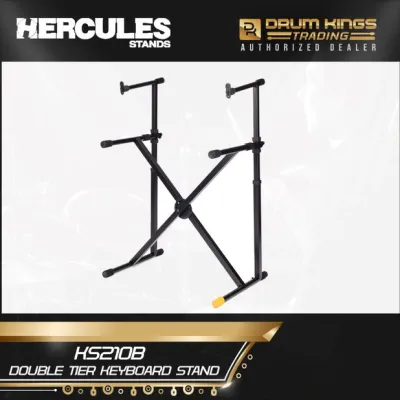

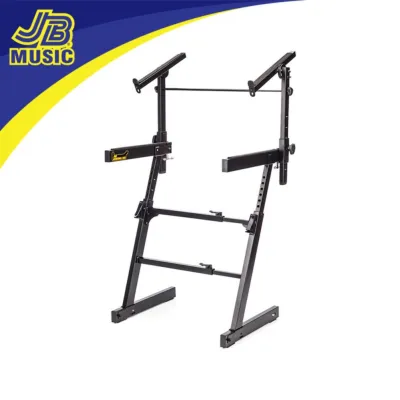
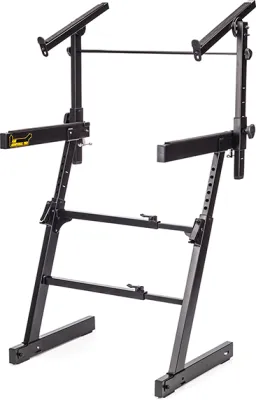
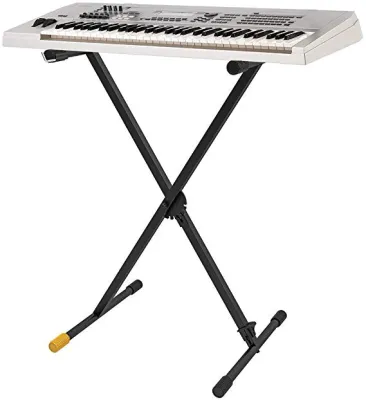
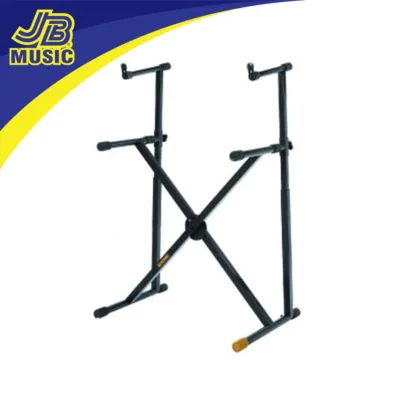
Prices are valid at publication and may change. Please refer to the product page for the latest price.
Hercules incorporates specific mechanical features across these designs to enhance usability. Many models feature patented locking systems, such as the EZ-LOK or AutoLock mechanisms, which secure the frame at predetermined height intervals without relying solely on friction. Additionally, adjustable rubber feet help level the stand on uneven surfaces, which is particularly useful in older venues or outdoor performance spaces. Understanding these structural foundations helps you anticipate how each stand will perform in your specific environment.
Evaluating Your Space, Posture, and Keyboard Requirements
Before choosing a stand format, you must analyze your physical environment and the physical characteristics of your keyboard. Space constraints are often the primary limiting factor for home studios and practice rooms. In compact urban apartments or cozy bedroom studios, a stand with a large footprint can quickly crowd the room. You must consider not only the floor space the stand occupies during use but also its folded dimensions. If you need to pack your gear away after every practice session to keep your living space tidy, a design that folds completely flat in seconds is highly advantageous.

Your playing posture is equally critical to your long-term comfort and joint health. Seated players require sufficient knee clearance and space to position sustain or expression pedals naturally. If a stand’s bracing forces you to splay your knees outward or sit too far back, you risk developing poor wrist angles and back strain. Standing players, on the other hand, require a stand that remains rigid at higher elevations, as taller settings can amplify any inherent lateral instability in a stand’s design.
Finally, the physical dimensions and weight of your keyboard dictate your structural needs. Heavy 88-key digital pianos with weighted hammer-action keys require a much stiffer support system than a lightweight 61-key synthesizer or MIDI controller. Before purchasing, always locate your keyboard manufacturer’s exact weight specifications and measure the depth of your instrument’s base. Placing a deep, heavy keyboard on narrow support arms can create a top-heavy setup that is prone to tipping if bumped.
X-Style vs. Z-Style vs. Table-Style: Feature Breakdown
Each of the three primary stand designs offers distinct trade-offs in terms of portability, stability, and ergonomic comfort. Examining these features in detail allows you to match the structural strengths of each style to your specific performance or practice scenarios.
X-Style: Best for Portability and Tight Spaces
The X-style stand is the traditional choice for gigging musicians who need to set up and tear down their gear in a matter of minutes. The cross-brace design allows the entire unit to fold into a slim, linear shape that fits easily into the trunk of a compact car or alongside other gear in a transport vehicle. Because the height adjustment mechanism typically alters the angle of the intersecting legs, raising an X-style stand naturally narrows its width, while lowering it widens the support base.
However, this intersecting geometry introduces clear physical limitations. For seated players, the diagonal bars block the space directly under the keyboard, preventing you from tucking your knees comfortably beneath the instrument. This obstruction also makes it difficult to place sustain or expression pedals in an ergonomic position, often forcing you to stretch your legs awkwardly to the sides. Consequently, the X-style design is most suitable for standing performers, traveling players, or those using lightweight keyboards and MIDI controllers that do not require complex pedal setups.
Z-Style: Best for Legroom and Seated Playing
Z-style stands are engineered to address the ergonomic shortcomings of the X-style design by clearing the space beneath the keyboard. Because the support columns are positioned at the far left and right edges of the frame, seated players enjoy completely unobstructed legroom. This open architecture allows you to sit close to the instrument with your knees at a comfortable 90-degree angle, mimicking the posture of playing a traditional acoustic piano. It also provides ample floor space for a full array of foot pedals, which remain easy to reach and operate.
Adjusting a Z-style stand typically involves independent height adjustments on each vertical column, along with a telescoping center beam that adjusts the overall width. While this design provides excellent stability and customization, it is inherently bulkier than an X-style stand. Even when disassembled or folded, Z-style frames often retain a three-dimensional shape that requires more storage space and longer assembly times. This makes them highly suited for permanent home studios, teaching spaces, or dedicated rehearsal rooms where the stand rarely needs to be moved.
Table-Style: Best for Heavy Digital Pianos and Multi-Keyboards
Table-style stands provide a highly stable foundation for heavy, high-value instruments. By utilizing four independent legs, this design distributes the downward force of a heavy digital piano or workstation across four distinct points on the floor. This structural layout minimizes the front-to-back and side-to-side wobble that can occur during energetic playing or when executing rapid glissandos on a weighted keyboard. Each leg can typically be adjusted individually, allowing you to level the stand precisely on uneven floors.
Another major advantage of the table-style design is its capacity for expansion. The rigid, rectangular top frame serves as an excellent anchor point for official multi-tier attachments, allowing you to stack a second or third keyboard safely above your primary instrument. While table-style stands do fold relatively flat—often with the legs folding inward against the top frame—they remain wider and heavier than X-style alternatives. They are the ideal choice for professional stage pianists, studio producers, and keyboardists who use heavy 88-key instruments or multi-keyboard rigs.
Decision Framework: Choosing Your Ideal Stand
To finalize your decision, map your primary playing environment and equipment characteristics to the strengths of each design. If you are a mobile musician who prioritizes rapid setup times and compact transport, an X-style stand is highly practical. If you are a dedicated student or classical pianist who practices seated for hours at a time, a Z-style stand will protect your posture and accommodate your pedals. If you own a heavy, premium digital piano or plan to build a multi-keyboard workstation, a table-style stand offers the structural integrity required to protect your investment.
| Stand Type | Portability | Legroom | Weight Capacity Potential | Multi-Tier Compatibility |
|---|---|---|---|---|
| X-Style | High | Low | Medium | Low |
| Z-Style | Medium | High | High | Medium |
| Table-Style | Medium | High | High | High |
Before making a final purchase, always verify the specific model specifications on the manufacturer’s official product page or packaging. Ensure that the physical width of the stand’s support arms matches the depth of your keyboard, and confirm that any planned multi-tier add-ons are officially compatible with your specific stand model.
Verifying Weight Capacity and Stability Safely
When setting up your keyboard stand, safety should always be your primary concern. Placing an expensive digital piano on an underrated or improperly secured stand can lead to catastrophic equipment damage or personal injury. Always locate the exact weight of your keyboard in its user manual and cross-reference this figure with the official maximum load capacity printed on your stand’s packaging. Keep in mind that if you plan to use a multi-tier setup, the combined weight of all instruments and accessories must not exceed the stand’s total rated capacity.
Before placing your instrument on the stand, perform a thorough physical inspection of the frame. Verify that all locking pins, spring-loaded bolts, and adjustment knobs are fully engaged and tightened. Check that the rubber end caps on the support arms and feet are intact and clean; worn or missing rubber can cause the stand to slide on smooth tile or wooden floors. Gently push down on the empty stand from various angles to ensure there is no structural play or unexpected flexing.
If you notice any loose joints, stripped threads, or cracked welds during your inspection, do not attempt to use the stand. Stop the setup process immediately and consult the manufacturer or a qualified technician for replacement parts or repair advice. Taking a few moments to verify these safety checks ensures your gear remains secure, allowing you to focus entirely on your performance.
Frequently Asked Questions (FAQ)
Can I add a second tier to any Hercules keyboard stand?
No, multi-tier attachments are not universally compatible with all stand designs. Second-tier add-ons typically require a highly rigid frame to support the additional weight and leverage of a second instrument. While many Hercules Z-style and table-style stands feature dedicated mounting points or structural frames designed to accept official tier attachments, standard single-braced X-style stands generally do not support them safely. Always consult your specific stand’s manual to verify if it is rated for multi-tier expansion and to identify the approved accessory model numbers.
How do I prevent my keyboard from sliding off the stand?
To prevent your keyboard from shifting during play, ensure that the stand’s rubber grips are clean, intact, and positioned directly beneath the flat contact points of your instrument’s base. Adjust the width of the stand so that the support arms sit well within the outer edges of the keyboard, avoiding any uneven overhang. Additionally, make sure the stand is perfectly level by adjusting the leveling feet on uneven floors. If your keyboard has built-in threaded inserts on the bottom, check if your stand model supports direct locking straps or screws for an extra layer of physical security.
Community discussion
Share your experience or ask a question. Comments are reviewed before publication.