
Building a physical media collection dedicated to the “King of Philippine Movies,” Fernando Poe Jr. (FPJ), is a rewarding pursuit for cinema enthusiasts and collectors alike. His legendary career, spanning over several decades, produced some of the most iconic action films in local history. However, finding these classic titles on DVD or Blu-ray in the modern digital age presents unique challenges. Because many of these films were released during the transition from analog to digital formats, their physical availability is highly fragmented, with many titles now out of print or highly sought after on the secondary market.
To successfully navigate this landscape, collectors must understand the history of local physical media releases, know how to identify authentic discs, and implement proper storage techniques to protect their investment. This guide provides a comprehensive framework for sourcing, verifying, and preserving FPJ’s cinematic legacy on disc, ensuring that your home library remains a lasting tribute to a true cultural icon.
Understanding FPJ Physical Media Availability
The journey of classic Filipino cinema from the silver screen to home video formats has been a complex one. During the peak of FPJ’s career, films were primarily distributed theatrically on celluloid and later released for home viewing on VHS tapes. In the late 1990s and early 2000s, the local entertainment industry transitioned to digital optical discs, leading to the release of numerous FPJ titles on Video CD (VCD) and eventually DVD. These digital releases allowed fans to experience classics with improved convenience and durability compared to magnetic tape.
Products mentioned in this guide

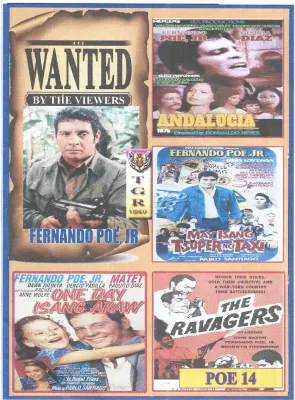
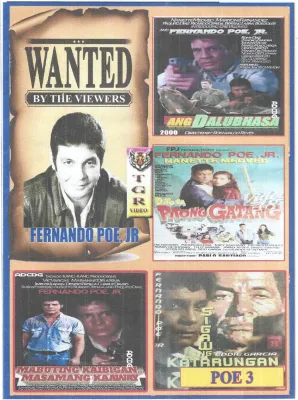
Prices are valid at publication and may change. Please refer to the product page for the latest price.
However, the availability of these DVDs has always fluctuated significantly. Unlike major Hollywood releases that enjoy continuous print runs, local physical media production is often limited to small, initial batches. Once these production runs sell out, the titles frequently go out of print due to expiring studio licenses, shifting distribution rights, or the high costs associated with maintaining physical inventory. Consequently, finding a specific FPJ film on DVD today often requires searching through specialized collector networks rather than standard retail shelves.
The landscape for high-definition Blu-ray releases is even more restricted. While several of FPJ’s most famous films have undergone extensive digital restoration for theatrical re-releases and streaming platforms, very few have transitioned to physical Blu-ray discs. The high manufacturing costs of Blu-ray, combined with a smaller local market for high-definition physical media, means that studios reserve this format for highly specialized, limited-edition commemorative releases.
Because of these market dynamics, collectors should avoid relying on static lists of available titles, which can quickly become outdated as stock levels change. Instead, the most effective strategy is to actively monitor official announcements from local film studios, heritage archives, and restoration projects. These organizations frequently announce limited-run physical releases or special box sets to coincide with cultural milestones, anniversaries, or film preservation campaigns.
Key Factors When Buying Classic Movies on Disc
When building your collection, understanding the technical specifications of physical media is crucial to ensure that the discs you purchase are compatible with your home entertainment system.

Region Codes Optical discs are often encoded with region locks to control global distribution. For DVDs, the Philippines is traditionally designated as Region 3 (Southeast Asia). However, many local film distributors release their DVDs as “Region All” (or Region 0), meaning they can play on any standard DVD player worldwide. For Blu-ray discs, the country falls under Region A, which also includes North America and East Asia. Before purchasing any disc, always inspect the back of the packaging for the region globe icon. Verify that your playback hardware—whether a dedicated disc player, a gaming console, or a computer drive—is compatible with the disc’s region code, or consider investing in a multi-region player to bypass these restrictions entirely.
Video and Audio Formats The visual and auditory quality of FPJ films on disc varies widely depending on when the transfer was made and the quality of the surviving source elements. Early DVD releases often feature standard definition (480i or 480p) transfers taken directly from older broadcast masters or VHS elements, resulting in a 4:3 aspect ratio and visible analog artifacts. In contrast, modern remastered editions utilize high-definition scans (often 1080p) from original 35mm film negatives, offering vastly superior clarity, color accuracy, and a widescreen presentation. Audio tracks also differ; while original releases preserve the authentic mono or stereo mixes, some special editions feature simulated multi-channel Dolby Digital surround sound. Check the technical specifications on the back cover to ensure the format aligns with your viewing preferences.
Special Editions and Box Sets As you search for titles, you will encounter various packaging formats, ranging from standard single-disc releases to elaborate collector’s box sets. Single-disc versions typically contain only the feature film with basic menu navigation. Special editions or commemorative box sets, however, often bundle multiple films together or include exclusive physical inserts such as booklets, production stills, or replica posters. These premium releases may also feature bonus disc content, including behind-the-scenes documentaries, interviews with cast members, and retrospectives on FPJ’s impact on Philippine culture. Always verify the exact contents of these editions before purchasing, as packaging designs can sometimes vary between different production runs.
Where to Source Authentic FPJ DVDs and Blu-rays
Finding genuine physical copies of classic local films requires a strategic approach to sourcing, as the market is filled with both rare gems and unauthorized reproductions.
Official Studio Stores and Distributors The safest and most reliable way to acquire authentic FPJ discs is to purchase them directly from official studio stores, authorized physical retailers, or licensed online distributors. Major local production houses and film archives occasionally maintain their own digital storefronts or partner with established retail chains. Purchasing from these authorized channels guarantees that you receive a high-quality, legally produced product while directly supporting ongoing film preservation and restoration efforts in the country.
Online Marketplaces For out-of-print titles that are no longer available through primary retail channels, online marketplaces and e-commerce platforms are valuable resources. However, shopping on these platforms requires careful vetting of individual sellers. Always filter your searches to prioritize merchants with high positive feedback ratings and a history of successful transactions. Examine product listings closely; authentic listings should feature detailed, high-resolution photos of the actual physical item, including the front, back, and disc surface, rather than generic stock images. Read customer reviews to check for complaints regarding bootleg copies or poor playback. Be realistic about pricing; while standard pre-owned DVDs may sell for reasonable amounts, extremely low prices (such as under ₱100 for a rare, out-of-print collector’s item) are a strong indicator of a counterfeit copy.
Secondhand and Specialty Shops Thrift stores, vintage media shops, and online collector forums are excellent venues for discovering rare FPJ releases. Many dedicated physical media collectors frequent specialized groups on social media platforms to trade, buy, and sell items from their personal libraries. When purchasing from individual collectors, always request clear photos of the disc’s reflective side to assess its physical condition. If you are shopping at a physical secondhand store, take the time to inspect the disc under direct light before making a purchase, checking for deep scratches or signs of wear that could affect playback.
How to Verify Disc Authenticity and Condition
Because classic local films are highly collectible, counterfeit copies are common in the marketplace. Performing a thorough physical inspection of any disc you purchase is essential to ensure you are receiving an authentic, high-quality release.
Packaging and Seals Authentic commercial releases are characterized by professional packaging standards. The cover art should be printed on high-quality, glossy or matte cardstock with sharp, legible text and vibrant colors. Counterfeit copies often feature blurry, pixelated artwork that has been poorly scanned and printed on standard paper. Look for official studio holograms, security seals, and correct copyright information on the back cover. Additionally, factory-sealed discs typically use neat, machine-folded shrink-wrap with clean seams, whereas bootlegs are often wrapped in loose, heat-sealed plastic bags.
Disc Surface and Printing The physical construction of the disc itself is one of the most reliable indicators of authenticity. Genuine commercial DVDs and Blu-rays are factory-pressed, featuring a silver or gold reflective layer on the readable side. In contrast, counterfeit copies are almost always burned onto recordable media (such as DVD-R or BD-R), which typically have a distinct purple, blue, or dark green tint on the bottom surface. Furthermore, authentic discs feature professional, screen-printed artwork directly on the label side. Bootlegs often utilize paper labels glued to the disc face—which can peel off inside your player and cause severe damage—or low-quality inkjet printing that smudges easily.
Menu and Subtitle Quality Once you insert the disc into your player, observe the user interface and navigation menus. Authentic studio releases feature fully functional, interactive menus with options for chapter selection, audio settings, and subtitles. The subtitle tracks (typically English or Tagalog) should be optional and cleanly rendered. Unauthorized copies, on the other hand, often bypass menus entirely, booting directly into the film, or feature hardcoded subtitles of poor visual quality that cannot be disabled.
Preserving and Storing Your Physical Movie Collection
Once you have acquired these rare physical releases, proper preservation is essential to protect them from degradation and ensure they remain playable for years to come.
Environmental Controls The tropical climate of the Philippines, characterized by high temperatures and intense humidity, presents significant challenges for physical media preservation. Excessive moisture can lead to “disc rot,” a chemical reaction that oxidizes the reflective aluminum layer inside the disc, rendering it unreadable. High humidity also encourages the growth of mold on both the disc surface and the paper cover inserts, while extreme heat can warp plastic cases and the discs themselves. To mitigate these risks, store your collection in a cool, dry room with stable temperatures. Consider using airtight storage containers equipped with silica gel packets to absorb excess moisture, or maintain a dehumidifier in your dedicated media room.
Handling and Cleaning Proper handling techniques are vital to prevent physical damage to your discs. Always hold discs by their outer edges or the center spindle hole, avoiding any contact with the readable reflective surface. Natural oils from your skin can attract dust and create smudges that interfere with the player’s laser. If a disc requires cleaning, use a soft, dry microfiber cloth designed for optical media. Wipe gently in straight, radial lines from the center hub outward to the edge. Never wipe in a circular motion, as circular scratches can align with the laser track and cause permanent skipping, whereas radial scratches are easily bypassed by the player’s error-correction system.
Storage Solutions Always store your discs vertically on sturdy shelving, similar to books. Avoid stacking cases horizontally, as the cumulative weight can warp the plastic cases and put uneven pressure on the discs inside. Keep your storage shelves away from direct sunlight, which can fade the cover art and heat the cases to damaging temperatures. Finally, always return each disc to its original protective case immediately after viewing rather than leaving it exposed on tables or inside the player tray. Avoid using cheap plastic sleeves or binder folders, as some materials can react chemically with the disc surface over time, causing irreversible damage.
Frequently Asked Questions (FAQ)
Are there official Blu-ray releases for classic FPJ films?
While several of Fernando Poe Jr.’s classic films have been digitally restored in high definition, official physical Blu-ray releases remain extremely rare. Most restored titles are distributed via digital streaming platforms or theatrical screenings. When physical Blu-ray editions are produced, they are typically limited-run collector’s items released by specific studios or preservation archives. To find out if a particular title has received a Blu-ray release, monitor the official communication channels and online storefronts of local film restoration initiatives.
Can I play region-locked DVDs on a standard local player?
Whether a region-locked DVD will play depends entirely on the specifications of your playback hardware. Standard DVD players sold in the local market are typically configured for Region 3 or Region All. If you purchase an imported disc locked to another region (such as Region 1), a standard local player will display a region error and refuse to play the disc. To determine compatibility, consult your player’s instruction manual or check the settings menu for regional configurations. Avoid attempting unauthorized firmware modifications to bypass region locks, as this can permanently damage your device and void its warranty.
What should I do if I receive a scratched or unplayable disc?
If you purchase a disc that fails to play correctly, your first step should be to contact the seller or retailer immediately to inquire about their return, exchange, or refund policy. Before concluding that the disc is permanently damaged, inspect the surface for dust, fingerprints, or minor smudges. Clean the disc gently using an approved microfiber cloth, wiping in straight lines from the center outward. If the disc features deep, physical scratches that penetrate the plastic protective layer, professional resurfacing may be required, though this should only be attempted with proper equipment to avoid further damage.
Community discussion
Share your experience or ask a question. Comments are reviewed before publication.